1 Introduction: Everything is bits
This course is about how, not what. You already know what a computer, a file and the Internet are - you use them all day. Over twelve lectures we look inside: How data is represented digitally, how the computer executes a program, how an operating system shares the machine, and how the Internet moves your bits around the world, layer by layer. This first chapter does two jobs at once. It builds the shared vocabulary that every later module leans on - data and information, hardware and software, bit, byte and encoding, the Von Neumann machine - and it explains how the course itself works: Lectures, Practice sessions, mandatory assignments and the exam. One idea will keep returning until it feels obvious, and it is worth stating on line one: Inside the machine, everything is bits; what differs between a number, a text and a photo is only the encoding.
1.1 What information technology is
Information technology is not one thing but the interplay of five: Hardware, the physical devices; software, the programs that run on them; data, the information being processed; networks, how systems communicate; and people, the users and professionals who design and run it all. The course follows exactly that structure: Digital representation of data first (Lectures 1–3), then the computer (Lectures 4–5), then the Internet and its applications (Lectures 6–7), then the network itself, layer by layer (Lectures 8–10), before two closing lectures of repetition and exam preparation.
The first crucial distinction of the semester is between two words that everyday language treats as synonyms.
Definition 1.1 (Data and information) Data are raw symbols - meaningless on their own. Information is data plus a shared rule for reading it: A context, a convention, an encoding.
Example 1.1 The string 040102 is data. Is it a date? If so, which one - the 4th of January 2002, the 1st of April 2002, or the 2nd of January 2004, depending on whether you read it as Norwegian, American or ISO order? Is it a postal code, a price, a serial number? The symbols alone cannot say. Only once sender and receiver agree on a rule - “this is a date, day–month–year” - does the data carry meaning. Likewise the bit pattern 01001000 01101001 is just sixteen bits; read under the ASCII convention it becomes the greeting “Hi”, and the reading 23.5 becomes information only when you know it is a temperature in degrees Celsius. Keep this example close: Most of what look like deep mysteries in this course - file formats, protocols, character sets - are at bottom agreements of exactly this kind.
1.2 Hardware, software, and the IPOS loop
Every system in this course has two halves. Hardware is the physical: Electronic and electro-mechanical parts - CPU, RAM, SSD, keyboard, screen, cables. Software is the instructions: The programs that run on that hardware - the operating system, the applications, your own code. Neither works alone: Hardware without software is a non-functional lump; software without hardware is text in a file.
Software itself splits into two layers. System software - the operating system (Windows, macOS, Linux), device drivers, utilities - manages the hardware and serves other programs. Application software - the browser, the word processor, the game - is what you use directly, and it runs on top of the system software: Applications do not control the hardware directly; they request services from the operating system. That division of labour gets a whole module of its own (Module 5).
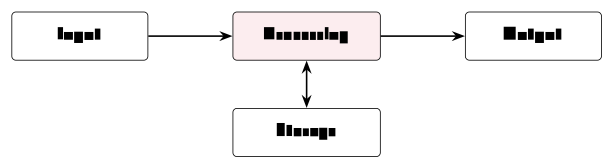
What does every computer actually do? Strip away the variety and one pattern remains, the IPOS model: Input (keyboard, mouse, sensors) flows into Processing (the CPU), which produces Output (screen, printer), with Storage (disk, memory) underneath the whole loop. Every computer, from a phone to a server, follows this pattern; the Von Neumann architecture of Section 1.5 is one concrete realisation of it.
1.3 Bits, bytes, words - and scale
All of it is measured in a small family of units.
Definition 1.2 (Bit, byte, word) A bit is one binary digit, either 0 or 1 - physically a low or high voltage; the smallest unit of all. A byte is 8 bits, giving 2^8 = 256 distinct values - enough for one text character (for example 01000001 is the letter A) - and the smallest individually addressable unit of memory, hence the standard unit for memory and file sizes. A word is the CPU’s natural unit, 32 or 64 bits today; it determines, among other things, how much memory the CPU can address. Modern PCs and phones are 64-bit machines.
From the byte upward, each named step is about a factor of one thousand, and it pays to attach a mental anchor to each: A kilobyte (\approx 10^{3} bytes) is a short email; a megabyte (10^{6}) a photo or an MP3 song; a gigabyte (10^{9}) a high-quality movie; a terabyte (10^{12}) a laptop’s whole disk; a petabyte (10^{15}) the scale of CERN’s particle-collision data. One honest footnote to this ladder: Two conventions coexist - the decimal kilobyte (1 kB = 1000 bytes) and the binary kibibyte (1 KiB = 1024 bytes). Disk vendors count in tens, memory chips in twos; for this course, powers of ten suffice.
1.4 Everything is bits: The idea of encoding
Now the central idea of the whole course. Numbers, letters, sounds, images and video are all stored and moved as sequences of 0s and 1s. Across all media the bits are the same; what changes is the encoding. The number 42 is 00101010. The letter A is 01000001 under ASCII. The colour red is 11111111 00000000 00000000 in 24-bit RGB - full red channel, no green, no blue. A second of music is a stream of 16-bit numbers, sampled 44 100 times per second.
How do bits count at all? Exactly the way decimal digits do, with two symbols instead of ten: Three bits run 000, 001, 010, 011, 100, 101, 110, 111 - eight values, because 2^3 = 8 - and every additional bit doubles the range. That doubling is the quiet engine behind everything from the 256 values of a byte to the address space of a 64-bit word. Module 2 works through binary conversions and arithmetic properly; this is only the taste.
The hardware itself understands only a handful of primitive types: Booleans (a single true/false bit), integers of 8, 16, 32 or 64 bits, floating-point approximations of real numbers (standardised as IEEE 754), characters (a code point in ASCII or Unicode), and addresses - pointers to locations in memory. Everything richer - a JPEG image, a UTF-8 text, a spreadsheet - is built from these primitives by following an agreed standard. Which brings us to the definition the whole course hangs on.
Definition 1.3 (Encoding) An encoding is the shared convention that assigns meaning to bit patterns. A file format, a network protocol and a programming language are each, at bottom, a standard for interpreting bits. Without the encoding, the bits are noise.
Example 1.2 (One byte, three meanings) Take the single byte 01000001 and read it three ways. As an unsigned integer it is 64 + 1 = 65. As an ASCII character it is the letter A - not by coincidence, since ASCII simply assigns the letter A to the value 65. As the red channel of a 24-bit RGB pixel it is an intensity of 65/255 \approx 25\,\% - a dark red contribution. Same bits, three meanings; the meaning lives entirely in the convention you bring to the reading. This is Example 1.1 again, one level down, and it is the single most important idea in the course: Whenever a later module introduces a mysterious-sounding artefact - a character set in Module 3, an IP header in Module 9 - ask first, what is the encoding here, and who agreed on it?
Read the byte 01001101 three ways: As an unsigned integer, as an ASCII character, and as the red channel of an RGB pixel (roughly, in percent). Work exactly as in Example 1.2.
Solution. Write the weights over the bits and sum the columns holding a 1:

As an integer: 77. As ASCII: Code 77 is the letter M (twelve places after A = 65). As a red channel: 77/255 \approx 30\,\% intensity. Same bits, three readings - the convention decides.
1.5 Inside the machine: Von Neumann
Bits and encodings run on a physical machine, and nearly every machine you will ever meet - laptop, phone, server, the controller in a washing machine - follows one blueprint, proposed in 1945 and still standing.
Definition 1.4 (The Von Neumann architecture) A Von Neumann computer consists of a CPU (the processor, which runs instructions), memory (RAM: Fast and temporary, holding both data and the program), and input/output devices (keyboard, screen, storage, network), all connected by a system bus. Its defining feature is the stored-program principle: Instructions and data share the same memory, so a machine can be reprogrammed simply by loading different bits.
Pause on the stored-program principle, because it is easy to read past. A program is data - bits in memory like any other - which is why the same physical machine can be a typewriter this minute and a chess opponent the next. (It is also, incidentally, why the encodings of Definition 1.3 matter so much: Even the instructions are bit patterns under a convention, the CPU’s instruction set.)
Example 1.3 (The heartbeat) At the centre of the machine, the CPU runs one simple cycle, repeated without pause. Fetch: Read the next instruction from memory - a dedicated register, the program counter, holds its address. Decode: Determine what the instruction means. Execute: Perform it - add, compare, jump, store. Then fetch again. At a clock speed of 3 GHz a single core repeats this cycle about three billion times per second; every program you have ever run, from a game to this PDF viewer, is nothing but a very long sequence of such steps. When Module 4 opens the CPU properly, this cycle is what we will find inside.
Around the CPU, the Von Neumann roles are realised in the physical parts of every PC: RAM as fast volatile working memory (its contents vanish at power-off); SSD or HDD as persistent storage (slower, but it survives power-off); the motherboard carrying the bus everything plugs into; the GPU as a specialised processor for graphics and parallel computation; and the I/O devices at the edges. Memory, in fact, forms a hierarchy: Registers, then cache, then RAM, then SSD/HDD - each level faster, smaller and costlier than the one below, with data moving up as the CPU needs it. And because raw hardware would be unusable if every program had to drive it directly, an operating system sits on top, doing three things at once: Managing resources (allocating CPU time, memory and storage), providing abstraction (programs see files and windows, not disk sectors and pixels), and enforcing protection (keeping programs and users from interfering with one another). Module 5 is devoted to it. Finally, computers rarely work alone: They join networks - one building’s machines form a LAN, and the Internet is a network of networks, with the web as its best-known service, moving pages over HTTP. Modules 6–10 unfold how that connection actually works, layer by layer.
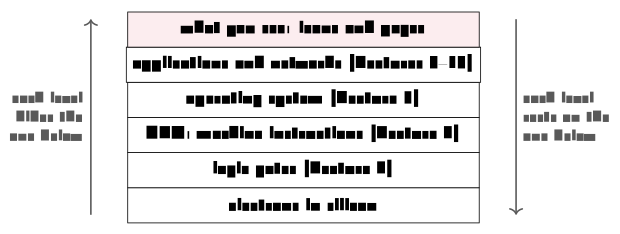
Andrew Tanenbaum opens his classic Structured Computer Organization with an idea that quietly organises this entire course: A computer is best understood as a tower of levels, each one a small “virtual machine” built on top of the one below and hiding its details. At the top, you click an icon; below that, an application runs; below that, the operating system manages resources; below that, the CPU executes machine instructions; below that, logic gates switch; and at the very bottom, electrons move through silicon. Nobody - not even a professional - thinks about all the levels at once; the whole trick of computing is that each level only needs to trust the one directly beneath it. Keep the tower in mind as a map: Lectures 1–3 live near the bottom (bits and their encodings), Lecture 4 climbs from gates to the CPU, Lecture 5 adds the operating system, and Lectures 6–10 build the network levels on top. Whenever a chapter feels abstract, ask which floor of the tower you are standing on.
(Tanenbaum & Austin, Structured Computer Organization, 6th ed., 2013)
1.6 Eighty years in six milestones
How did we get here? Six dates sketch the arc. 1945: ENIAC, the first general-purpose electronic computer - thirty tons, 18 000 vacuum tubes. 1971: The microprocessor - Intel’s 4004 puts an entire CPU on a single chip. 1981: The IBM PC brings personal computing to businesses and homes. 1991: Tim Berners-Lee at CERN launches the World Wide Web. 2007: The iPhone takes the smartphone mainstream. 2022: ChatGPT puts generative AI in the hands of the public.
The arc has a prehistory worth a sentence. Charles Babbage designed a fully programmable mechanical computer - the Analytical Engine - in the 1830s, a century before the technology existed to build it, and Ada Lovelace wrote programs for it that could never run. And the first working program-controlled computer was not ENIAC but Konrad Zuse’s relay-based Z3, completed in Berlin in 1941 - largely unknown outside Germany for decades. History books call 1945 the starting line mostly because ENIAC was electronic, general-purpose and publicly known; the ideas are older than the hardware.
(Tanenbaum & Austin, 2013, ch. 1)
The engine behind that arc has a name: Moore’s Law, Gordon Moore’s 1965 observation that the number of transistors on a chip doubles roughly every two years. Plotted on a logarithmic scale the growth is a straight line - the signature of an exponential - running from the 4004’s 2 300 transistors to modern chips carrying tens of billions (Apple’s M-series processors are the everyday example). Two honest caveats close the story. First, the law is finally slowing: Transistors approach atomic scales and heat limits bite, so the gains now come from more cores, from GPUs and AI accelerators, and from chiplet designs rather than from ever-smaller transistors alone. Second, any projection forward - the lecture chart dashes one for 2030 - is an assumption, and should be labelled as such. Either way, that exponential hardware growth is exactly what now makes everyday AI possible - which is why the chapter ends where it does.
1.7 AI in your studies
Generative AI - ChatGPT, Claude, Gemini and their siblings - is already part of how you work, and pretending otherwise would be silly. It explains, summarises, codes and drafts quickly and fluently. It also, with the same fluency, confidently invents facts, skips the reasoning, and - used carelessly - deprives you of exactly the practice this course exists to give you. The skill you need is not whether to use it but when and how.
The rule of thumb for this course: Use AI as a tutor that questions you, not a writer that replaces you. Four practices make the rule concrete. Explain it back: After the AI explains something, close the tab and re-explain it in your own words - if you cannot, you have not learned it yet. Ask for problems, not answers: “give me three practice questions on binary conversion” beats “convert this for me”. Verify sources: AI invents references; check them before citing anything. And reflect on the exchange: What did you actually learn?
On academic integrity the line is drawn where you would expect. Generally acceptable: Using AI to clarify a concept, practising with AI-generated exercises, getting feedback on a draft you wrote. Not acceptable: Submitting AI text as your own work, letting AI write your assignment, entering exam questions into a chatbot. When in doubt, ask - and Kristiania’s full policy is published on kristiania.no.
1.8 How the course works
Twelve lectures, each paired later in the same week with a two-hour guided Practice session - bring your laptop; the exercise sets and their solutions live in Canvas. Across the semester there are three mandatory individual assignments (arbeidskrav), graded pass/fail; all three must be approved before you may sit the exam. The final exam is on-site, multiple choice, graded pass/fail (bestått / ikke bestått) - and all course material is examinable. The course is 7.5 ECTS, which honestly means about 200 hours of student work across the semester; the lectures and Practice sessions are the visible tip of that budget.
Everything lives in Canvas: Announcements (preparation notes before each lecture - check before class), messages and discussions, materials (slides, scripts, worksheets, solutions), assignment submission, and grades. Expectations run in both directions. From you: Attend and engage, do the reading before class, submit on time, ask when something is unclear. From me: Clear, well-prepared lectures, materials posted in good time, replies within 48 hours, and office hours every week.
About that reading. The lectures are the curriculum, so the reading load is deliberately light: 15–30 minutes per lecture, listed precisely in Readings.xlsx on Canvas, drawn from the recommended textbook - Fox, Information Technology, 2nd edition (CRC Press, 2021). Light is not the same as optional: Skipping the chapter is cheaper this week and more expensive every week after, because each lecture builds on terms the reading introduced; readers cross the break-even point after a few weeks, and arrive at the exam having read the curriculum once already. (You will meet this argument - monster included - as a slide at the start of every lecture. Do not grow the monster.) For optional extra depth, Kabelová and Dostálek’s Understanding TCP/IP serves the network modules, and the free Cisco Networking Academy is a good companion for Modules 8–10.
Before Lecture 2 (Number systems). Get the textbook. Read its chapter on number systems - Readings.xlsx gives the exact pages. Try, on paper, to write the numbers 0 through 15 in binary. And think about one question: Why do computers use binary rather than decimal?
1.9 Summary
Information technology is hardware, software, data, networks and people; this course walks that list over twelve lectures. Information is data plus a shared rule for reading it (Definition 1.1), and inside the machine that rule is an encoding (Definition 1.3): The same byte is 65, the letter A, or a quarter-strength red, depending on the convention (Example 1.2) - everything is bits, and only the encoding differs. Those bits live in a Von Neumann machine (Definition 1.4): CPU, memory and I/O on a common bus, with programs stored as data and executed by the fetch–decode–execute heartbeat billions of times per second (Example 1.3). Eighty years of Moore’s Law carried us from ENIAC’s vacuum tubes to chips with tens of billions of transistors - and to AI, which you should use as a tutor, not a ghost-writer. Next week we teach those bits to count.
Interactive checks
A round of quick interactive drills - instant feedback, all in your browser, nothing recorded. Every task has a show-solution button; clicking it straight away is no fun.
Self-check
Try these before the Practice session; sketch answers follow below.
Exercise 1.1 (Data versus information) Why is 040102 data rather than information - and what, precisely, would turn it into information?
Exercise 1.2 (One byte, three readings) Interpret the byte 01000010 in three ways: As an unsigned integer, as an ASCII character, and as an RGB red channel (roughly, in percent).
Exercise 1.3 (Why a byte has 256 values) Why does a byte have exactly 256 possible values, and what does each additional bit do to the range of a binary number?
Exercise 1.4 (The stored-program principle) State the stored-program principle in one sentence, and explain why it means a computer can be “reprogrammed by loading different bits”.
Exercise 1.5 (The fetch–decode–execute cycle) Name the three steps of the CPU’s basic cycle in order, and say which register keeps the cycle on track and how.
- The symbols carry no meaning by themselves - date, postal code and serial number are all possible readings; a shared convention (“a date, day–month–year”) turns it into information (Definition 1.1). (2) As an integer: 64+2 = 66; as ASCII: The letter B (one code point after A = 65); as a red channel: 66/255 \approx 26\,\% intensity. (3) A byte is 8 bits and each bit has two states, so 2^8 = 256 values; every additional bit doubles the range. (4) Instructions and data share the same memory; since the program is itself just bits in memory, loading different bits gives the same hardware a different behaviour. (5) Fetch, decode, execute; the program counter holds the address of the next instruction, so the CPU always knows where to fetch from - and jumps work by changing it.
What we now share is a vocabulary: Everything in the machine is bits; meaning is added by encodings; and the machine that holds them follows Von Neumann’s blueprint, executing stored instructions billions of times per second. What we cannot yet do is work with those bits. Chapter 2 builds directly on the doubling rule met here: How binary numbers are read, written, converted and computed with - including, by one elegant trick, the negative ones.