5 Operating systems
Chapter 4 ended with a machine that runs one instruction at a time - and with a question deliberately left hanging: How can a laptop run a browser, a music player and a dozen background tasks at once? That illusion, and all the management behind it, is the job of the operating system. The core idea of the chapter fits in one sentence: The OS sits between the hardware and your programs, sharing the machine’s resources safely and fairly. We take it in five steps - what an OS is, how it runs many programs on few cores, how it gives every program its own memory, how it keeps data after power-off, and finally how you talk to it.
5.1 What an operating system is
The most useful definition looks at the same software from two directions at once.
Definition 5.1 (Operating system) Viewed top-down, an operating system is an abstraction: It hides the messy hardware details and presents a simpler, uniform “virtual machine” to programs and users - you click an icon; you do not toggle voltages. Viewed bottom-up, it is a resource manager: It shares the CPU, memory, storage and devices among programs, giving each one time and space, and deciding who runs, when, and with what. Both views describe the same software: It makes the machine usable (top-down) and shareable (bottom-up).
The OS’s first gift is abstraction, and the best example is one you use constantly: The file. Underneath, report.pdf is metadata (name, size, dates, permissions) plus content (bytes on a disk); files are grouped into directories; and the whole thing is shown to you as clickable icons - not as block numbers on a disk. Chapter 1 promised that the mysteries of this course are mostly agreed conventions; here the OS goes one step further and manufactures a convenient fiction for you.
Architecturally, the OS sits between the hardware and the applications: Everything an application does on the hardware goes through it - through its process manager, memory manager, device manager (the drivers) and file manager. And the doorway is deliberately narrow.
Definition 5.2 (System call) A program cannot touch the disk or network directly - that would be unsafe. Instead it makes a system call: A request such as “open this file” or “send these bytes”. The CPU switches into kernel mode, the OS does the work and checks permissions, and returns the result.
Reading a file, opening a window, starting a program - each is a system call underneath, and this guarded boundary is what keeps the system safe. The full job list of an OS then reads: Provide a user interface (shell or GUI); provide programming interfaces - the API, the set of calls a program uses to ask for OS services without touching hardware; manage resources (CPU, memory, storage, I/O); manage devices through drivers - small programs that teach the OS how to talk to one device, so that applications can use the same simple read and write operations regardless of the hardware underneath; handle networking and security; and organise the file system. A one-paragraph history shows the direction of travel: Batch processing in the 1950s (one job at a time), time-sharing in the 1960s–70s (many users, one machine, interactively), personal computers with graphical desktops in the 1980s–90s, and mobile and cloud since the 2000s (sandboxed apps; fleets of servers managed as one system). The trend never reversed: Each step let more programs and people share the same hardware more safely.
5.2 Processes and scheduling
Three terms carry the rest of the chapter.
Definition 5.3 (Process, thread, resource) A process is a program in execution, together with the resources it is using - its memory, open files and current state. A thread is a single “thread of control” inside a process: One sequence of instructions executed one after another; a process can have several. A resource is anything a program needs to run - CPU time, RAM, files, network, I/O devices.
The distinction to internalise: A program on disk is passive; a process is that program running, with a slice of the machine assigned to it. Threads let one process do several things at once - a browser tab can load a page on one thread while another keeps the interface responsive - and threads of the same process share its memory, which is powerful and risky in equal measure. If two threads update the same variable at the same time, the result depends on timing: A race condition. The OS therefore offers locks, so only one thread enters a critical section at a time; getting this right is one of the hardest parts of systems programming.
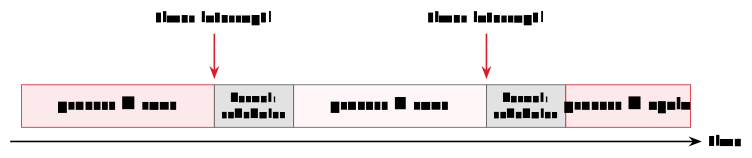
Now the headline question. Each CPU core runs one instruction at a time - Chapter 4 was emphatic about it - yet many programs seem to run together. The answer is multitasking: The OS rapidly switches the core between processes, a few milliseconds each, far too fast to notice, so they appear simultaneous; several cores additionally run several processes truly in parallel. The switching is the work of two mechanisms worth naming precisely. The scheduler is the part of the OS that decides which ready process runs next. A context switch is the act of swapping processes on a core: Save the current process’s state (registers, program counter - the very registers of Chapter 4), load the next process’s saved state, resume it where it left off. Each switch costs a little time; too many waste the CPU on bookkeeping instead of real work, so schedulers balance responsiveness against overhead.
One question hides inside that description, and it is the best question in the chapter: While a process is running, the OS is not - the core is busy executing the process’s instructions, one HIDAS cycle after another, and nothing in Chapter 4’s loop ever says “now hand over to the operating system”. So how does the OS ever get the CPU back to make its scheduling decision? A greedy or crashed program certainly will not volunteer. The answer is a piece of hardware: The timer interrupt. A small clock circuit on the chip is programmed by the OS to fire at regular intervals - typically every few milliseconds - and when it fires, the CPU itself, in hardware, suspends whatever it was doing, saves where it was, and jumps to a fixed OS routine in kernel mode. From there the OS is in charge: It can note that the time slice is over, run the scheduler, and context-switch to the next process. No program can prevent this, because no program is asked - the interrupt is wired into the machine below the level any software runs on. The same mechanism, triggered by devices instead of the clock, is what ends a process’s wait: When the disk finishes a read, the disk controller raises an interrupt, the OS briefly gets the CPU, and moves the blocked process back to ready. Multitasking, in other words, is not a clever program; it is a clock with the right to interrupt anything.
Both key ideas of this chapter are stated memorably in Tanenbaum and Bos’s Modern Operating Systems, the standard text on the subject for four decades. The two-sided Definition 5.1 is theirs almost verbatim: The OS as an extended machine (top-down - a cleaner, safer computer than the real one) and as a resource manager (bottom-up - time and space multiplexed among competing programs). And their treatment of interrupts earns the timer its proper place in history: Early batch systems could be monopolised by a single looping program until an operator physically intervened; the hardware timer is what made true time-sharing possible in the 1960s, because for the first time the machine itself guaranteed the OS would regain control. One more Tanenbaum observation to file away: Old ideas in computing rarely die - they return whenever the technology shifts (he calls it “ontogeny recapitulates phylogeny”). Batch processing, for instance, was declared obsolete by interactive computing - and lives on happily in every data centre’s overnight jobs.
(Tanenbaum & Bos, Modern Operating Systems, 4th ed., 2014, ch. 1–2)
How does the scheduler choose? Three classic strategies span the design space. Round-robin gives each process a fixed time slice in turn - fair and responsive, the workhorse of interactive systems; a shorter slice feels snappier but costs more context-switch overhead. First-come-first-served runs processes in arrival order - simple, but one long job delays all the rest. Priority scheduling runs important processes first, with priorities static or dynamic. Real systems combine these - for instance priority levels, each scheduled round-robin - to balance fairness, responsiveness and throughput.
At any moment, each process is in one of three states: Running (using a core right now), ready (able to run, waiting its turn in the queue), or blocked (waiting for something - a disk read, say - and unable to use the CPU until it arrives). The scheduler dispatches ready processes; I/O waits move them to blocked; completion of the wait moves them back to ready.
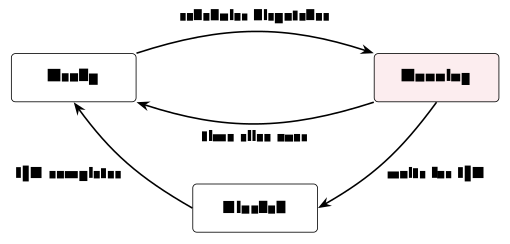
Classify each situation: (a) a video encoder is crunching frames on core 3 right now; (b) a text editor has work to do but all cores are busy with other processes; (c) a download manager has asked the network card for data and cannot continue until it arrives. And: Which event moves process (c) onward, and into which state?
Solution. (a) running - it holds a core. (b) ready - runnable, queued, waiting for the scheduler. (c) blocked - waiting for I/O, unable to use a core even if one were free. When the network data arrives, the interrupt lets the OS move (c) to ready - not straight to running; it still has to be dispatched.
Two dangers close the section. The first is the deadlock: Process A holds resource 1 and wants resource 2; process B holds resource 2 and wants resource 1; both wait for the other - forever. The OS can prevent, avoid, or detect and recover from deadlocks, but the pattern is a classic risk wherever processes compete for limited resources. The second is guarded against by hardware: The CPU runs in one of two privilege levels. In user mode - normal applications - there is no direct access to hardware or drivers, only the memory the OS granted, and a restricted instruction set; anything dangerous must go through the API. In kernel mode - the core of the OS - every instruction is allowed and all memory is reachable, with no hardware protection: A bug here can crash the machine. This split is why one misbehaving app usually cannot take down the whole system: It is boxed into user mode.
Example 5.1 (Watching it happen) None of this is hidden. Windows ships Task Manager (Ctrl-Shift-Esc), macOS ships Activity Monitor, and Linux offers ps (a snapshot), top (live), and the /proc filesystem, where processes are exposed as files. Open one now and count: Even an “idle” machine runs dozens of processes - the resident parts of the OS, services, and the background halves of your applications. Watch the CPU column for a minute and you are watching the scheduler make its millisecond decisions in aggregate. The Practice session does exactly this, hands-on.
5.3 Memory management
To execute, a process’s instructions and data must be in memory: Its code and data sit in RAM while it runs - and note that the OS is a program too; part of it stays resident in memory at all times. (The cache of Chapter 4 sits between CPU and RAM as before; nothing here replaces it.) The memory manager’s job is threefold: Hand out RAM to processes, keep them from reading each other’s memory, and reclaim it when they finish. Its central trick has a name.
Definition 5.4 (Virtual memory) Under virtual memory, every process is given a private, continuous-looking address space; the OS maps each process’s virtual addresses to real locations in RAM. Processes feel alone with the whole memory, but are kept safely separate.
Virtual memory can even be larger than the physical RAM installed. Memory is handled in fixed-size blocks called pages; rarely-used pages can be moved out to disk to free RAM - swapping - and brought back when the process needs them. The catch is the memory hierarchy of Chapter 4: Disk is far slower than RAM, so a little swapping is fine, but heavy swapping (“thrashing”) makes a machine crawl - which is exactly why adding RAM often speeds up a busy computer: Less needs to be pushed out to the slow disk.
The protective half of the same mechanism: Each process may only touch the memory the OS mapped for it; an attempt to step outside is caught by the hardware and the OS, and the offending process is stopped - the familiar “segmentation fault”. This isolation is why a crash in one program usually leaves the rest of the system, and your other work, untouched.
5.4 Files and storage
Memory is temporary; RAM forgets everything at power-off (Chapter 4’s volatile). For anything we want to keep, the OS writes to permanent storage - SSD or HDD - organised as directories and files. “Save”, precisely, means: Copy from volatile RAM to non-volatile storage, through the file system.
The file system arranges files and folders as a tree, rooted (on Unix-like systems) at /, with each file carrying its metadata: Name and type, size and location, access rights, creation and modification dates. Behind the tidy tree, the file manager must guarantee four hard things: Safe storage (write data reliably onto the devices), sharing (let multiple users and programs use data in a controlled way), protection (guard against errors, crashes and malicious users), and concurrency control - locks again, this time so two writers cannot corrupt the same file at once. Much of this is invisible until it fails, which is exactly why the OS works hard to make sure it does not.
The visible half of protection is permissions: Every file records access rights, typically for three actions - read (view the contents), write (change or delete it), execute (run it as a program) - granted to the owner, a group, and everyone else. Permissions are a first line of security: They stop one user, or a careless program, from reading or wrecking another’s data. (And now the octal aside of Chapter 2 pays off: chmod 755 is exactly these three-times-three bits, written in the base whose digits are three bits each.)
5.5 The user’s view
How do you drive all this? Through one of two front-ends to the same OS. The shell is the text interface: You type a command, the OS responds - start and stop programs, move and copy files, inspect the system, and automate repetitive work with scripts, which is why servers and developers rely on it. The GUI is the graphical alternative. Every system ships both: Windows pairs Explorer with cmd.exe and PowerShell; macOS pairs Finder with zsh/bash in Terminal; Linux pairs its file managers with bash and friends. Pick whichever suits the task - they are two doors into the same house.
The same core job, finally, is tuned for very different machines. Desktop systems (Windows, macOS, Linux) optimise general use and responsiveness; servers (Linux, Windows Server) optimise throughput, uptime and many users; mobile systems (Android, iOS) optimise battery, touch and app sandboxing; embedded and real-time systems (RTOS, embedded Linux) fit tiny devices with strict timing. Family resemblances run deep: Android is built on the Linux kernel, and macOS and iOS share a Unix core - the same principles scale from a watch to a data centre.
One last question ties the machine and its manager together: How does the OS itself get started? A short chain hands control upward at power-on: The firmware (BIOS/UEFI) checks the hardware and starts a boot loader; the boot loader loads the kernel into memory; the kernel takes over and starts the rest of the system, up to the login screen or desktop. From there on, everything in this chapter is in play.
Before Lecture 6 (The Internet). Read the Module 6 chapter in the textbook (Readings.xlsx for the pages). Try this: Open a terminal, run ping, and then look up your machine’s IP address. And think about the question the next chapter opens with: When you open a web page, your request leaves your computer - how does it find the right server among billions of machines?
5.6 Summary
The operating system is abstraction plus resource management (Definition 5.1): It hides the hardware behind files, windows and APIs, and shares the machine through the guarded doorway of system calls (Definition 5.2). A process is a running program (Definition 5.3); the scheduler shares the CPU among many of them through rapid context switches - round-robin, priorities and their combinations - creating the simultaneity that Chapter 4’s single-cycle machine could not provide, while user mode versus kernel mode keeps the sharing safe. Virtual memory (Definition 5.4) gives each process its own address space, extends RAM onto disk through paging and swapping, and enforces the isolation behind the humble segmentation fault. The file system makes data survive power-off: A tree of files with metadata, permissions and locks. And shells, GUIs and OS families are all front-ends and variations on this same design - booted, at power-on, by a firmware-to-kernel chain. Next week the single machine ends: We connect them.
Interactive checks
A round of quick interactive drills - instant feedback, all in your browser, nothing recorded. Every task has a show-solution button; clicking it straight away is no fun.
Self-check
Exercise 5.1 (The two views of an OS) State the two views of an operating system, and give one concrete example of each from your own computer use today.
Exercise 5.2 (System calls and kernel mode) Why must a program use a system call to read a file rather than accessing the disk directly - and which CPU mechanism from this chapter enforces that?
Exercise 5.3 (The blocked state) A process is blocked. What does that mean, what typically caused it, and what has to happen before the scheduler will consider it again?
Exercise 5.4 (Virtual memory and thrashing) Your computer has 8 GB of RAM but the processes you run request 12 GB in total, and everything still works - slowly. Name the mechanisms involved and explain the slowness.
Exercise 5.5 (Race conditions and locks) Two threads of one process increment the same counter “simultaneously” and updates go missing. Name the problem and the OS-provided remedy.
- Top-down, abstraction: You saved “a file” without knowing any disk block numbers. Bottom-up, resource management: A dozen programs shared your CPU cores today without you assigning time to any of them.
- Direct disk access would bypass all permission checks and could corrupt shared state; the user-mode/kernel-mode split makes privileged operations impossible outside the kernel, so the program must request them via a system call. (3) It is waiting for something - typically I/O such as a disk read - and cannot use the CPU; when the awaited event completes, the OS moves it back to ready, and only then can the scheduler pick it. (4) Virtual memory with paging and swapping: Rarely used pages are moved to disk and fetched back on demand; since disk is orders of magnitude slower than RAM, heavy swapping (thrashing) dominates the runtime. (5) A race condition; the OS provides locks so that only one thread at a time enters the critical section that updates the counter.
The single computer is now complete: Hardware (Chapter 4) plus the operating system that shares and protects it (Chapter 5). Useful - but alone. Building on the abstraction idea at the heart of the OS, Chapter 6 connects machines: The internet as a network of networks, organised in layers that hide each other’s details exactly as the OS hides the hardware’s.