2 Binary, hex and two’s complement
Chapter 1 left us with three results: Everything is bits, the machine that processes them follows the Von Neumann pattern, and an encoding is the convention that gives bits meaning. This chapter examines the most fundamental encoding of all: How numbers themselves are represented. We answer why hardware insists on exactly two digits, learn to convert between decimal, binary and hexadecimal in both directions, and finish with the one trick most students ask about - two’s complement, which lets a CPU subtract using nothing but an adder. Fair warning and encouragement in one: This material constitutes the bulk of the first mandatory assignment (Innsendingsoppgave 1), so the time you invest here pays off twice.
2.1 Why binary?
Binary is not an aesthetic choice; it is a physical necessity. An electronic component can tell two voltage states apart reliably - LOW around 0 V read as 0, HIGH around 5 V read as 1, with a wide safety gap between them. Try to squeeze ten states into the same voltage range and each digit gets a narrow band; a little noise, heat or manufacturing variation pushes a value across a boundary and silently corrupts the digit. Two states survive the real world; more do not.
The device that supplies those two states is the transistor: An electronic switch controlled by a voltage, with no moving parts. A sufficient signal on its control input (the base or gate) lets current flow - interpreted as 1; below the threshold no current flows - interpreted as 0. A modern chip contains tens of billions of these switches, each switching billions of times per second; coordinating them is, at bottom, all that computation is. (How switches are wired into logic and arithmetic is Chapter 4’s subject.)
One switch gives two values; what does a row of them give? With N bits one can represent 2^N distinct values, and every additional bit doubles the count - the doubling you met in Chapter 1, now with anchors worth memorising: 4 bits give 16 values (one hexadecimal digit, as we shall see); 8 bits give 256 (one byte - one character); 16 bits give 65 536; 32 bits about 4.3 billion (the size of the IPv4 address space, Module 9); 64 bits about 1.8\times10^{19} - the word size of a modern CPU (Definition 1.2).
Example 2.1 (Three switches, eight values) Counting in binary obeys the same rule as counting in decimal; there are simply only two digit symbols, so columns fill up sooner. In decimal you count 0, 1, …, 9 - and then, out of symbols, you write 10: Reset the column and carry one. In binary you count 0, 1 - and are out of symbols already, so the next number is 10. Three bits therefore run 000, 001, 010, 011, 100, 101, 110, 111: Eight patterns, 2^3 = 8, counting 0 through 7. Same rule, fewer symbols.
2.2 Positional number systems
To read binary fluently, first notice what our own decimal system actually does. In the number 5372, each position carries a weight that is a power of the base, and the digit says how many of that weight to count: 5372 = 5\cdot10^{3} + 3\cdot10^{2} + 7\cdot10^{1} + 2\cdot10^{0}.
Definition 2.1 (Positional notation) In a positional number system with base b, a numeral d_n d_{n-1}\cdots d_1 d_0 (with digits 0 \le d_i \le b-1) denotes the value d_n\cdot b^{\,n} + d_{n-1}\cdot b^{\,n-1} + \cdots + d_1\cdot b^{1} + d_0\cdot b^{0}.
The rule is the same for every base; only the alphabet changes. Base 2 (binary) uses the digits 0 and 1 and is imposed on us by the hardware. Base 10 (decimal) uses 0–9 and is imposed on us by habit. Base 16 (hexadecimal) uses 0–9 and A–F and exists, as Section 2.4 shows, purely as a compact notation for bits.
Because the same characters denote different numbers in different bases, we must mark the base. The string 101 is 101_2 = 5 read as binary, 101_{10} = 101 read as decimal, and 101_{16} = 257 read as hex. This script uses subscripts; in source code you will meet the prefixes 0b101 (binary), 0x65 (hex) and 0o12 (octal) doing the same job. Notice, by the way, that this is Definition 1.3 again in miniature: The symbols are the data, the base is the convention.
2.3 Binary numbers: Converting in both directions
Every binary conversion rests on the powers of two, so it is worth memorising the first eleven outright: 1, 2, 4, 8, 16, 32, 64, 128, 256, 512, 1024. Two of them carry extra meaning: 2^{10} = 1024 \approx 10^3, which is why a kilobyte is approximately one thousand bytes; and 2^{16} = 65\,536, the range of a 16-bit value.
Binary to decimal is a reading exercise: For every position holding a 1, add that position’s power of two.
Example 2.2 Convert 1101010011_2 to decimal. Write the weights over the bits - 512, 256, 128, 64, 32, 16, 8, 4, 2, 1 - and collect the ones: 512 + 256 + 64 + 16 + 2 + 1 = 851_{10}.

Decimal to binary runs the other way, and two methods reach the same answer. The subtraction method is the intuitive one: Subtract the largest power of two that fits, write a 1 in its column, and repeat with the remainder; powers that do not fit get a 0.
Example 2.3 (Continuation of Example 2.2) Convert 851 back. Does 512 fit? Yes - write 1, keep 339. Does 256 fit? Yes - 1, keep 83. 128? No - 0. 64? Yes - 1, keep 19. 32? No - 0. 16? Yes - 1, keep 3. 8? No. 4? No. 2? Yes - 1, keep 1. 1? Yes - 1, done. Reading the bits from the highest power down: 851_{10} = 1101010011_2, exactly the string we started from.
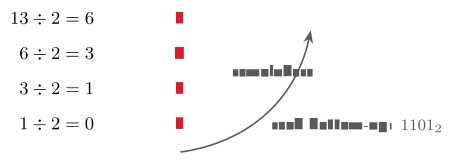
The division method is the mechanical alternative - and the one a computer itself uses: Divide by two repeatedly, record each remainder, and read the remainders from the bottom up. For 13: 13\div2 = 6 remainder 1; 6\div2 = 3 r 0; 3\div2 = 1 r 1; 1\div2 = 0 r 1. Bottom-up: 1101_2 = 13_{10}. Use whichever you like; check yourself with the other.
Three quick ones to try before reading on (they were the in-class pause, and they are the level of Assignment 1): 1011_2 to decimal; 25_{10} to binary; 10101_2 to decimal. Answers: 11; 11001_2; 21.
Convert 89_{10} to binary twice - once by the subtraction method, once by the division method - and check that the two answers agree. Then read 0110\,1110_2 back into decimal.
Solution. Subtraction: 64 fits (keep 25), 32 no, 16 fits (keep 9), 8 fits (keep 1), 4 no, 2 no, 1 fits \Rightarrow 101\,1001_2. Division: 89{:}2 = 44 r 1, 44{:}2 = 22 r 0, 22{:}2 = 11 r 0, 11{:}2 = 5 r 1, 5{:}2 = 2 r 1, 2{:}2 = 1 r 0, 1{:}2 = 0 r 1; bottom-up 101\,1001_2 - the same. Back-reading: 64+32+8+4+2 = 110_{10}.
2.4 Hexadecimal and octal
Long bit strings are hard for human eyes to parse. Decide at a glance whether 1010\,0100\,1001\,1011_2 \quad\text{and}\quad 1010\,0100\,1000\,1011_2 denote the same value - most readers cannot, and the single differing bit hides in plain sight. Decimal compresses the value (42 139) but obscures the bits entirely. Hexadecimal gives the best of both: As compact as decimal, yet each digit maps cleanly onto exactly four bits, because 16 = 2^4. The value above is \mathrm{A49B}_{16} - four characters, and each one expandable back into its four bits (a nibble) without any arithmetic. Base 16 borrows 0–9 from decimal and adds A–F for the values 10–15; the digit-to-nibble table (A = 1010, B = 1011, …, F = 1111) is small enough to learn and worth it.
Converting between binary and hex is therefore mere grouping: Split the bits into fours from the right, replace each group by its digit - 1010\;0011\;1001\;1111_2 = \texttt{0xA39F} - and expand digit-by-digit for the reverse. No powers, no division.
Hex is not an academic exercise; it appears wherever raw bytes need a readable form, and you will meet all four of these again in this course. Colours: #D81E2E is (R,G,B) = (216,30,46) - the Kristiania red, three bytes written as three hex pairs. Memory: Addresses are written in hex, e.g. 0x7FFE0040. Networks: A MAC address is six hex bytes, e.g. 3C:5A:B4:1F:9E:02 (Module 10). Encodings: A Unicode code point such as U+1F600 (Chapter 3). The reading rule throughout: One hex digit is four bits; one pair of hex digits is one byte.
Octal, base 8, plays the same game with groups of three bits, since 8 = 2^3: 110\;010\;100\;011_2 = 6243_8. It is largely historical but persists in one place every Linux user meets - Unix file permissions, chmod 755. And should you ever need hex ↔︎ octal: They do not convert directly; binary is the common ground, so expand the hex digits to bits, regroup in threes, and read off (\mathrm{BB3}_{16} = 1011\,1011\,0011_2 = 101\,110\,110\,011_2 =
5663_8).
2.5 Binary arithmetic and two’s complement
Addition first, because everything else reduces to it. Binary addition is decimal addition with only four cases per column: 0+0=0; 0+1=1; 1+0=1; and 1+1=0 carry 1. Add column by column from the right, propagating carries exactly as in decimal: 0011 + 0010 = 0101, that is, 3+2=5.
Alongside arithmetic, bits support logical operations applied to each position independently, with no carry between columns: AND is 1 only if both inputs are (it masks bits); OR is 1 if either is (it sets bits); XOR is 1 if exactly one is (it toggles bits); NOT inverts a single input. So 1100\;\mathrm{AND}\;1010 = 1000, 1100\;\mathrm{OR}\;1010 = 1110, 1100\;\mathrm{XOR}\;1010 = 0110. These four are the building blocks of low-level programming - and, as Chapter 4 shows, of the hardware itself. A close relative is shifting: Sliding every bit one place left multiplies the value by two (0000\,0011 \to 0000\,0110, i.e. 3 \to 6), one place right divides by two. Shifting is far cheaper than multiplication, which is why compilers replace \times2, \times4, \times8 with shifts whenever they can.
Now the real question: So far every number has been positive - how does a fixed row of bits store -19? Three schemes were proposed. Sign-and-magnitude spends the leftmost bit on the sign (+5 = 0101, -5 = 1101): Intuitive, but it has two zeros and awkward arithmetic. Ones’ complement negates by inverting every bit (-5 = 1010): Still two zeros. Modern hardware settled on the third.
Definition 2.2 (Two’s complement) In two’s complement, the negative of a value is obtained by inverting every bit and then adding 1. The scheme has a single zero and is the standard signed representation in essentially all modern hardware.
Example 2.4 (-19 in 8 bits) Start with +19 = 0001\,0011. Invert every bit: 1110\,1100. Add 1: 1110\,1101 - that is -19. Verify by adding it to +19: 0001\,0011 + 1110\,1101 = 1\,0000\,0000; discard the carry-out beyond the eighth bit and the result is 0000\,0000 = 0, exactly as 19 + (-19) should be.
Why this scheme won is visible in the verification: With two’s complement, subtraction is just another addition. To compute A - B, the CPU computes A + (-B) - so a single adder circuit performs both operations, a significant engineering advantage.
Example 2.5 (Subtraction as addition) 50 - 19: The CPU forms -19 = 1110\,1101 as above and adds: 0011\,0010\,(50) + 1110\,1101\,(-19) = 1\,0001\,1111; discard the carry-out and read 0001\,1111 = 31. What we write as a subtraction, the machine performs as an addition. Try 12 - 7 yourself the same way: +7 = 0000\,0111; invert, 1111\,1000; add 1, 1111\,1001 = -7; add to 0000\,1100\,(12) to get 1\,0000\,0101; discard the carry: 0000\,0101 = 5.
Write -42 in 8-bit two’s complement, and verify your answer by adding it to +42.
Solution. +42 = 0010\,1010. Invert: 1101\,0101. Add 1: 1101\,0110 = -42. Check: 0010\,1010 + 1101\,0110 = 1\,0000\,0000; discard the ninth bit and the result is 0000\,0000 = 0, as 42 + (-42) must be.
A fixed bit width also fixes the range. Unsigned, N bits run from 0 to 2^N - 1; signed two’s complement runs from -2^{N-1} to 2^{N-1} - 1. For 8 bits that is 0–255 unsigned and -128 to +127 signed; for 32 bits roughly \pm2.1 billion signed. The signed range is slightly asymmetric because zero occupies one slot, grouped with the positives. Exceed the range and the value wraps around silently: Unsigned 1111\,1111\,(255) + 1 becomes 0000\,0000\,(0); signed 0111\,1111\,(+127) + 1 becomes 1000\,0000 - which two’s complement reads as -128. The hardware does not warn you. Overflow bugs of exactly this kind are a recurring, and occasionally dangerous, source of software failures.
2.6 Assignment 1, and what comes next
Today’s material constitutes the bulk of Innsendingsoppgave 1: Decimal ↔︎ binary conversion, binary addition with carries, subtraction via two’s complement, number-system characteristics, and the design of a base-16-like system of your own. Practical guidance from the lecture, worth repeating verbatim: Show your working - the reasoning is graded, not only the answer; verify yourself with a calculator’s “programmer” mode; work through the Practice exercises first; and begin early - the assignment is individual, all three arbeidskrav must be approved to sit the exam, and resubmission is possible only if you submit early enough to use it.
Before Lecture 3 (Text & multimedia). Read the Module 3 chapter in the textbook - Readings.xlsx gives the pages. Watch the short video on ASCII and Unicode in Canvas (~10 minutes). Try a small experiment: Save a .txt file containing å ø æ and an emoji, and compare the file size with a plain-English file. And think about why the same word occupies different numbers of bytes under different encodings - Chapter 3 answers it.
2.7 Summary
Hardware imposes binary: Two voltage states are reliable, ten are not, and every bit is a transistor, on or off. Positional notation (Definition 2.1) applies to any base - the same rule, a different alphabet - and conversions follow from it: Binary to decimal by summing the weights of the ones (Example 2.2), decimal to binary by subtracting powers of two or by repeated division. Hexadecimal is binary in four-bit groups - \mathrm{A39F} is 1010\,0011\,1001\,1111 - and octal the same in threes. And two’s complement (Definition 2.2) - invert and add 1 - gives negative numbers with a single zero and reduces subtraction to addition, so the CPU needs only an adder; the price of a fixed width is a fixed range, and silent overflow at its edges.
Interactive checks
A round of quick interactive drills - instant feedback, all in your browser, nothing recorded. Every task has a show-solution button; clicking it straight away is no fun.
Self-check
Exercise 2.1 (Binary to decimal) Convert 1011\,0110_2 to decimal, showing the weights you summed.
Exercise 2.2 (Decimal to binary, two methods) Convert 173_{10} to binary twice: Once by the subtraction method, once by the division method.
Exercise 2.3 (Hexadecimal to bits and back) Expand \mathrm{F3}_{16} into bits, and give its decimal value.
Exercise 2.4 (Subtraction in two’s complement) Compute 9 - 12 in 8-bit two’s complement, and interpret the resulting bit pattern.
Exercise 2.5 (Unsigned overflow) In unsigned 8-bit arithmetic, what is 250 + 10 - and why is the answer dangerous rather than merely wrong?
- 128+32+16+4+2 = 182. (2) 173 = 128+32+8+4+1 \Rightarrow 1010\,1101_2; division remainders bottom-up give the same.
- \mathrm{F} = 1111, 3 = 0011, so 1111\,0011_2 = 243.
- -12 = invert 0000\,1100 and add 1 = 1111\,0100; then 0000\,1001 + 1111\,0100 = 1111\,1101 with no carry-out - a negative pattern; invert and add 1 to read its magnitude: 0000\,0011 = 3, so the result is -3. (5) 250+10 = 260 > 255; the value wraps to 260-256 = 4 - silently, with no error signalled, which is why overflow bugs go unnoticed until they do damage.
We can now count, convert and calculate in binary, and we know why the hardware insists on two digits - numbers are settled. Building on exactly this, Chapter 3 applies the encoding idea of Chapter 1 to everything that is not a number: Text through ASCII and Unicode, images, sound and video. The bits stay the same; only the conventions grow richer.