6 The Internet
We now have a complete single computer: Hardware (Chapter 4) plus an operating system that shares it (Chapter 5). Useful - but isolated. From here to the end of the course the subject is networks: How billions of these machines find each other and exchange data. This chapter draws the big picture whose details fill Lectures 7–10, and its core idea deserves stating up front: The Internet is a network of networks, and it works because everyone follows the same layered set of protocols. By the end you will be able to trace a single web-page load through five layers - and watch it happen with tools on your own machine.
6.1 The internet and the web
Definition 6.1 (The internet) The internet is not one network but a vast network of networks: Independent networks - homes, campuses, companies, carriers - joined together. It has no central owner; the networks cooperate by following shared protocols, and any machine can reach any other, network to network. The word itself says it: Inter-net, a link between networks.
The component networks are classified mainly by reach: A PAN covers a person or a desk (Bluetooth earbuds); a LAN a building or campus (home Wi-Fi, an office network); a MAN a city; a WAN a country or the world - and the internet is the largest WAN of all, built by interconnecting countless LANs and other networks. Zoom out over any such network and two regions appear: The edge - the end systems, clients and servers, where the users sit - and the core - the mesh of routers that forwards data between them.
Inside that core, there are two fundamentally different ways to move data, and the old telephone network and the internet made opposite choices. Circuit switching reserves a dedicated path for the whole call: Guaranteed capacity, but wasted whenever the line is idle. Packet switching - the internet’s choice - splits data into packets, each routed on its own, with links shared on demand. Packet switching wins when traffic is bursty, as most data traffic is: No one sits on idle capacity, and the network degrades gracefully under load.
Between the two pure designs lies a third, worth knowing because it keeps returning. A virtual circuit sets up a path through the network before data flows - like a telephone call - but then sends packets along that fixed path, with no capacity reserved: The connection is an agreement in the routers’ tables, not a copper wire. Classic wide-area technologies such as X.25 and Frame Relay worked this way, and Dostálek and Kabelová treat them at length because much of the pre-internet data world ran on them. The pure datagram design won the internet - every packet independent, no setup, maximal resilience - but the virtual-circuit idea never died: Modern carrier backbones use label switching (MPLS) to pin packet flows to predictable paths for exactly the old reasons, guaranteed capacity and simple forwarding. Old ideas in networking, as in operating systems, recur whenever the technology shifts.
(Dostálek & Kabelová, Understanding TCP/IP, 2006, ch. 1)
That efficient, shared design is part of why the internet could grow as it did: From ARPANET, the first packet-switched network, in 1969; through TCP/IP (1974–83), the common protocol that let networks join; DNS in 1983, names instead of raw addresses; the World Wide Web in 1991, which made it usable for everyone; to the always-on mobile-and-cloud era - roughly two-thirds of humanity online today, heading past six billion users. Each step added usefulness on the same idea: Independent networks, cooperating through shared protocols.
Two distinctions before moving on, because everyday language blurs both. First, the internet carries many services - the web (HTTP), e-mail (SMTP/IMAP), file sharing (FTP), streaming, voice calls, DNS, VPNs - each a separate application protocol on the same infrastructure; Chapter 7 meets several of them. Second, therefore: The internet is not the web. The internet is the infrastructure; the web - invented 1989–90 by Tim Berners-Lee at CERN, opened to all in 1991, built on HTTP for transfer and HTML for page structure, with CSS added in 1994 by Håkon Wium Lie, also at CERN - is one service running on it, alongside the rest.
Who physically connects it all? Internet Service Providers, arranged in tiers: Your access ISP connects you upward to regional providers, which connect to the tier-1 global backbones; large networks also peer directly at internet exchange points. Every link in that chain works only because both ends follow the same rules - which is the next section’s subject.
6.2 Protocols
Definition 6.2 (Protocol) A protocol is a shared set of rules for exchanging messages - the etiquette of a machine conversation. Both sides must speak the same protocol, in the same order, or the exchange fails, exactly as two people need a shared language.
What must such a set of rules pin down? Far more than “what to say”: The data format (how a message is structured), addressing (who is sending, who receives), error handling (detecting and recovering from damage), flow control (not overwhelming the receiver), timing (when to send and how fast) and sequencing (putting pieces back in order). Think of posting a parcel: The address, the box, what happens if it is damaged, how fast the post office can accept them - a protocol settles all of that, for data. The classic summary compresses these into three words borrowed from the study of language: Syntax (the form - word order, data formats), semantics (the meaning - what each control field means and how to react) and timing (the when - matching both sides’ speeds). Get any one wrong and communication breaks; a correctly spelled message at the wrong time is still a failure.
Who writes the rules down? Open bodies, so that anyone can implement them: The IETF (Internet Engineering Task Force) develops internet protocols, publishing each standard as a numbered RFC (Request For Comments); IANA (Internet Assigned Numbers Authority) hands out the global numbers - IP address blocks and the top-level domains. Because the rules are public, a phone, a laptop and a server from different makers interoperate; no single company owns “how the internet talks”.
6.3 Layered models
One protocol per task is fine - but a full conversation needs many at once, and the way to keep them organised is the single most important design idea of the networking half of this course: Layers. Split one impossible job into a stack of small, independent ones: Each layer does one job and offers a service to the layer above; a layer can be swapped out - Wi-Fi for cable - without touching the others; and each layer talks to its peer on the other machine, as if directly. If that sounds familiar, it should: It is the same idea as abstraction in the operating system (Definition 5.1) - hide the details below, present a clean service above.
Two standard ways of slicing the stack have become the references. The OSI model describes seven layers and is the teaching reference; the TCP/IP model describes four or five and is what the internet actually runs. This course uses the five-layer version, in which OSI’s top three layers (application, presentation, session) fold into one “application” layer:
Definition 6.3 (The five-layer stack) From top to bottom: Application (the programs’ conversation - HTTP, DNS, …), transport (a reliable stream between processes - TCP), network (end-to-end routing across networks - IP), data link (neighbour to neighbour - Ethernet, Wi-Fi), physical (the actual signal - cable, plug, radio). Lectures 7–10 take these one layer at a time, from the top down.
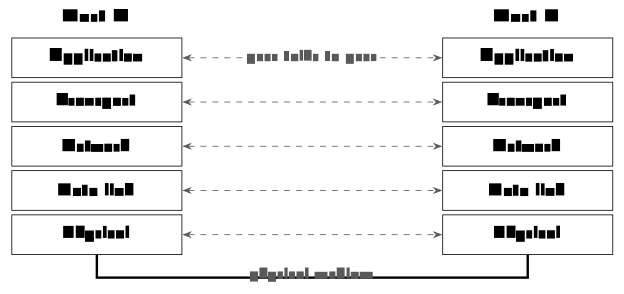
The bottom layer rests on a physical medium, and the choices matter: Wired media - twisted-pair copper (Ethernet; cheap and common), coaxial cable (cable broadband), optical fibre (light; huge capacity over long distance) - and wireless - Wi-Fi for local radio, cellular 4G/5G for wide-area mobility, satellite for remote and global coverage. Each trades off speed, distance, cost and reliability: Fibre for backbones, radio for the last hop to your phone.
Whatever the medium, three numbers describe how a connection feels. Bandwidth is the maximum rate a link could carry, in bits per second - the width of the pipe. Throughput is the rate you actually get, after overhead and sharing. Latency is the delay for one bit to travel end to end; in practice it is usually measured as the round-trip time (RTT) - there and back - which is what ping reports. Keep bandwidth and delay apart in your head: A fat satellite link can still take half a second per round trip, and high bandwidth with high latency feels slow. Latency itself decomposes into four pieces, incurred at every hop: Processing delay (the router reads the header and decides the next hop), queuing delay (waiting behind other packets on the link), transmission delay (pushing all the bits onto the link) and propagation delay (the signal physically travelling the distance). Queuing is the one that varies most - it grows as the link gets busy, which is exactly the congestion that TCP fights in Chapter 8.
6.4 Encapsulation
How does one message actually pass through all five layers?
Definition 6.4 (Encapsulation) Going down the stack, every layer wraps the data from above with its own header carrying that layer’s control information - like putting a letter into ever-larger labelled envelopes. The receiver opens them in the reverse order on the way up.
Example 6.1 (The journey down, then up) Put sender and receiver side by side. The application hands its message to transport, which prepends its header; the network layer prepends its own; the link layer its own; and the result crosses the wire as a signal. On the receiving machine the unwrapping runs in exactly the reverse order, each layer reading and removing its peer’s header. The lecture’s analogy is air travel: Buy a ticket, check the bag, board, fly - and on arrival the steps are undone in reverse, land, leave the plane, collect the bag - each handled by the matching department. Crucially, each layer only “talks to” the same layer on the other side: The transport layers converse through their headers without caring what carried them.
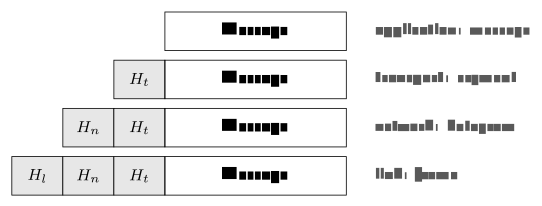
Because each layer adds its own wrapper, the same data gets a new name at each step, and the names are worth learning now because the next four chapters use them constantly: At the application layer it is a message; transport wraps it into a segment (adding port numbers - which process); the network layer into a datagram or packet (adding IP addresses - which host); the link layer into a frame (adding hardware addresses - which neighbour). Hear the word, know the layer - and know which kind of address is in play.
For each observation, name the layer and the data unit: (a) Wireshark shows destination port 443; (b) a header carries the addresses 3C:5A:B4:1F:9E:02 and A0:11:75:2C:00:1B; (c) a header carries 158.36.10.4 as its destination; (d) the payload reads GET /index.html HTTP/1.1.
Solution. (a) ports \Rightarrow transport layer, segment. (b) MAC addresses \Rightarrow link layer, frame. (c) an IP address \Rightarrow network layer, datagram. (d) protocol text \Rightarrow application layer, message.
6.5 Seeing the network
None of this is theory you must take on faith; five small commands reveal most of what your machine is doing, and each lives at a layer we just met. ping answers “can I reach that host, and how fast?” - it sends a small packet and reports whether a reply came and the round-trip time (network layer). traceroute (Windows: tracert) answers “what path do my packets take?” - it lists every router along the way and shows where a connection slows or stops (network layer); these two are the first commands to reach for when “the internet is down”. nslookup and dig answer “what IP is behind this name?” - a direct DNS query (application layer). ipconfig/ifconfig shows your own machine’s settings - address, gateway (link/network). netstat lists your open connections with their addresses and port numbers (transport).
When you need to go deeper than any of them, Wireshark - a “packet sniffer” - captures the frames passing through an interface and lets you open each packet and read its headers, layer by layer: It turns the encapsulation diagram of Example 6.1 into something you can watch live. A typical capture of a page load reads like the course so far in four lines: A DNS query and its answer, a TCP SYN to port 443, a TLS Client Hello. Wireshark is a powerful tool - and a standing reminder that unencrypted traffic is readable by anyone on the path. That thought deserves its own paragraph: An open, shared network is convenient and exposed. The classic threats are eavesdropping (reading traffic on the path), spoofing (faking a source address) and denial of service (flooding a target); the classic defences are encryption (TLS - unreadable in transit), authentication (proving who you are) and firewalls (filtering unwanted traffic). This is why so much of the modern internet is encrypted by default - a theme Chapter 7 picks up with HTTPS.
Example 6.2 (Loading a web page) One address typed; every idea of the chapter plays a part. (1) DNS turns the name into an IP address - application layer. (2) TCP opens a reliable connection to the server - transport. (3) IP routes the packets hop by hop across networks - network layer. (4) Each packet is encapsulated into frames and sent over the medium - link and physical. (5) HTTP carries the request and the page back, and the browser renders it. Protocols, layers, encapsulation, routing - all in the half-second before a page appears. Keep this five-step trace; Lectures 7–10 are, in effect, a slow-motion replay of it, one layer per week.
Before Lecture 7 (The application layer). Read the Module 7 chapter in the textbook (Readings.xlsx for the pages). Try this: Run traceroute (or tracert) to a website and count the hops. And think about the question that opens the next chapter: When you type a web address, what has to happen before the page can even be requested?
6.6 Summary
The internet is a network of networks (Definition 6.1): Hosts at the edge, routers in the core, packet-switched because bursty traffic shares links best - and the web is one service running on it, not the thing itself. Protocols are the agreed rules (Definition 6.2) - syntax, semantics, timing - published openly as RFCs so that everyone can interoperate. Layers tame the complexity (Definition 6.3): Application, transport, network, link, physical, each serving the layer above and conversing with its peer opposite - the OS’s abstraction idea, applied to communication. Encapsulation (Definition 6.4) carries one message down through message, segment, datagram and frame, and back up in reverse (Example 6.1). And simple tools - ping, traceroute, dig, ipconfig, netstat, Wireshark - let you watch all of it on your own machine (Example 6.2). Next week we zoom into the top layer, where your programs actually do the talking.
Interactive checks
A round of quick interactive drills - instant feedback, all in your browser, nothing recorded. Every task has a show-solution button; clicking it straight away is no fun.
Self-check
Exercise 6.1 (The internet versus the web) Explain the difference between the internet and the web in two sentences - one for each.
Exercise 6.2 (Packet versus circuit switching) Why did the internet choose packet switching over circuit switching? Name the traffic property that decides it.
Exercise 6.3 (Layers and data units) Name the five layers of the stack and the data-unit name at each of the middle three.
Exercise 6.4 (Bandwidth versus latency) A friend’s satellite connection has very high bandwidth, yet video calls feel sluggish. Which of the three performance numbers explains it, and which of the four delay sources dominates?
Exercise 6.5 (Choosing the right tool) Which tool would you use to answer each question: Is the server reachable? Where along the path does it stop? What address is behind the name? Which connections does my machine have open right now?
- The internet is the infrastructure: A network of networks moving packets. The web is one application-layer service on it, moving pages over HTTP - alongside e-mail, streaming and the rest. (2) Data traffic is bursty; packet switching shares links on demand so no one holds idle capacity, and it degrades gracefully under load, whereas a reserved circuit wastes capacity whenever the sender pauses. (3) Application, transport, network, data link, physical; segment (transport), datagram (network), frame (link). (4) Latency - specifically propagation delay: The signal’s physical travel to a satellite and back can approach half a second per round trip regardless of the pipe’s width. (5)
ping;traceroute;nslookup/dig;netstat.
The map is drawn: Layers, protocols, encapsulation, and one page load traced through all five levels. From here the course descends the stack one layer per chapter, starting at the top. Chapter 7 opens the application layer - DNS, HTTP, e-mail and file transfer: The actual conversations that everything below exists to carry.