3 Text and multimedia
Chapter 2 showed that numbers are bits. This chapter shows that so is everything else. Text, images, sound and video each get their own treatment, but one idea recurs so often that you should watch for it deliberately: A standard tells you how to read the bits - as letters, pixels, sound samples or frames. That is Definition 1.3 put to work four times over, and by the end of the chapter the phrase “an H.264 video with AAC audio in an MP4 container” will parse itself.
3.1 Text: From ASCII to code pages
To a computer, the letter A is just a number; the only question is which number. Spell out “Hello”: The characters become the numbers 72, 101, 108, 108, 111; each number becomes eight bits; each eight bits is one byte. The encoding is the agreement on which number means which letter - get it wrong, and “Hello” becomes gibberish.
The first widely shared answer was ASCII, the American Standard Code for Information Interchange of 1963: A 7-bit code, hence 2^7 = 128 values - one each for the English letters, the digits, punctuation, and a set of non-printing control codes (codes 0–31 and 127: NUL = 0, TAB = 9, LF = 10, ESC = 27, DEL = 127). The printable range is 32–126, and a few landmarks are worth knowing by heart: Space = 32, '0' = 48, 'A' = 65 (hex 0x41 - the byte of Example 1.2), 'a' = 97. Two patterns hide in those numbers. First, 'a' = 'A' + 32: Upper and lower case differ by a single bit. Second, the digits start at 48, so '5' − '0' = 5 - a classic programming trick for turning a digit character into its value. The full table is usually printed as 16 columns: The code is row × 16 plus column, in hex, so row 4x, column 1 is 0x41 = A.
ASCII’s limit is in its name: It only speaks American. 128 values leave no room for å, ø, æ - let alone German umlauts, French accents, Cyrillic, Chinese or emoji; a universal repertoire needs well over 100 000 characters. The first workaround stretched ASCII from 7 to 8 bits, gaining 128 extra slots per code page: ISO 8859-1 (“Latin-1”) fills 128–255 with Western-European letters; Windows-1252 is Microsoft’s variant with different glyphs at 128–159. But a code page only redefines the upper half, so no single page covers Norwegian and Russian and Greek at once - and the same byte shows a different character under a different page. That failure mode has a name you have seen on screen: Mojibake, the garbage that appears when a file crosses between pages. The fix had to be one universal table.
3.2 Unicode and its planes
Definition 3.1 (Unicode) Unicode (1991) is a single catalogue of every writing system: Each character receives a unique code point, written U+ followed by a hex number. Crucially, Unicode fixes only the character’s identity; how the code point is stored as bytes is left to a separate encoding. One catalogue, several encodings.
Examples across the range: A is U+0041 (the ASCII region - by design, the first 128 code points are identical to ASCII); the Norwegian Å is U+00C5; the Cyrillic Ya is U+042F; a common Chinese character sits at U+4EAC; the smiling-face emoji is U+1F600. The catalogue’s capacity is about 1.1 million code points, of which roughly 150 000 are assigned today, organised into seventeen planes of 65 536 code points each. Plane 0, the Basic Multilingual Plane (U+0000–U+FFFF), holds ASCII, the European scripts, most CJK - almost all everyday text. Plane 1, the Supplementary Multilingual Plane, holds historic scripts, mathematical symbols and the emoji. Plane 2 carries rare CJK ideographs; planes 3–13 are essentially unassigned room to grow; plane 14 holds special-purpose tag characters; planes 15–16 are private-use space for company logos and custom symbols. In practice, planes 0 and 1 hold almost all real text - which will matter in a moment, because “fits in 16 bits or not” is exactly where the encodings differ.
3.3 UTF-8: Code points into bytes
A code point is just a number; an encoding turns it into bytes, and three are in serious use. UTF-32 spends a fixed four bytes on every character: Direct indexing, but wasteful - four times the space for plain ASCII. UTF-16 spends two bytes on BMP characters and four beyond: Compact for CJK, used internally by Windows, Java and .NET, but not ASCII-compatible, and byte order matters. UTF-8 is the variable-length design that won the web: One to four bytes per character, ASCII-compatible, compact for Western text - the universal default of the modern web, most APIs, and Linux and macOS alike. Use it unless you have a strong reason not to.
UTF-8’s mechanism is elegant enough to learn exactly. The leading bits of the first byte announce the total length: A leading 0 means one byte (pattern 0xxxxxxx - plain ASCII, unchanged); 110xxxxx opens a two-byte character; 1110xxxx a three-byte one; 11110xxx a four-byte one. Every continuation byte begins 10xxxxxx. To decode, read the first byte’s prefix, collect the announced number of bytes, strip the marker bits, and join the remaining x bits: That is the code point.
Example 3.1 (Encoding Å by hand) The code point is U+00C5, i.e. \texttt{0xC5} = 1100\,0101_2. That needs more than 7 bits, so choose the two-byte pattern 110xxxxx 10xxxxxx, which has room for eleven data bits. Write the code point in eleven bits - 000 1100 0101 - and fill them in: 11000011 10000101, that is 1100\,0011\;1000\,0101 = \texttt{0xC3 0x85}. So Å is stored as the two bytes C3 85 - while a plain A remains the single byte 41. This, in one example, is why the file you saved after Lecture 2 grew when you typed å ø æ: The same “length” in characters is not the same length in bytes, and an emoji (plane 1) costs four.
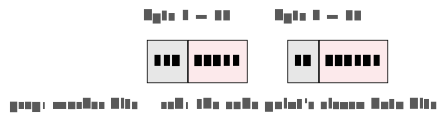
110xxxxx 10xxxxxx holds eleven data bits; filling in 000 1100 0101 yields the bytes C3 85.
Encode the Norwegian æ - code point U+00E6 - in UTF-8, following Example 3.1: Pick the byte pattern first, then fill in the data bits.
Solution. \texttt{0xE6} = 1110\,0110_2 needs more than 7 bits \Rightarrow two-byte pattern 110xxxxx 10xxxxxx with eleven data bits. Write the code point in eleven bits - 000 1110 0110 - and fill in: 11000011 10100110 = 1100\,0011\;1010\,0110 = \texttt{0xC3 0xA6}. So æ is the two bytes C3 A6.
3.4 Text files, binary files, and magic numbers
Every file is bytes; the question is only whether to read them as characters. A text file is one whose bytes are meant to be read as characters (UTF-8 by default): It opens cleanly in any editor and is easy to diff and version-control - .txt, .py, .html, .csv, .json and friends. A binary file carries bytes in some tool-specific format where any value 0–255 is valid: It looks like garbage in an editor and needs the right program - .png, .jpg, .mp3, .pdf, .zip, .exe, .docx. Strictly speaking, a text file is just a binary file whose every byte happens to be a valid character; the operating system does not distinguish - you do.
How, then, does software tell formats apart? Often by the first few bytes, the magic number, which identifies the format regardless of the file extension. PNG files begin 89 50 4E 47 0D 0A 1A 0A (containing the letters “PNG” plus binary markers); JPEG begins FF D8 FF; GIF spells out “GIF89a”; PDF begins with the characters %PDF-; ZIP begins 50 4B - “PK”, for Phil Katz, ZIP’s author; Linux executables begin 7F 45 4C 46 (“ELF”); and Java bytecode begins, famously, CA FE BA BE. Rename a PDF to photo.jpg and the magic number still says PDF: The extension is convention; the magic number is reality.
3.5 Images: Pixels or instructions
A digital raster image is a two-dimensional grid of colour values; each cell is one pixel, stored as three bytes - red, green, blue, each 0–255 - or four with an alpha (transparency) channel. The image is just that list of colour values, read left to right, top to bottom. Do the arithmetic once and remember the order of magnitude: A 4K image, 3840\times2160 pixels at 3 bytes each, is about 24 MB uncompressed.
The alternative stores not the result but the recipe: A vector image is a list of drawing instructions - “circle, centre (4,4), radius 3.2, fill red” - and therefore scales to any size without blockiness. Rule of thumb: Photographs are raster (too much irregular detail for any formula) in JPEG, PNG or WebP; logos, icons and type are vector (SVG, PDF), so they stay sharp at every size.
Colour itself comes in two opposite systems. On screen, colour is additive: Pixels emit light, and mixing red, green and blue makes any colour - all three at maximum is white, all zero is black, (255,0,0) is pure red; the web’s standard colour space is sRGB. On paper, colour is subtractive: Ink absorbs light, white comes from the paper itself, and the printing inks are cyan, magenta, yellow and black - CMYK, where K stands for the key plate (and conveniently avoids clashing with B for blue); C+M+Y alone mix to a muddy brown, so black gets its own, cheaper ink. More ink means darker, more light means brighter - which is why a design vibrant on screen can print duller, and designers calibrate.
Finally, formats. JPEG: Raster, lossy - superb for photographs, poor for logos and text, where its artefacts show. PNG: Raster, lossless - the choice for logos, screenshots and anything needing transparency, at the price of larger photo files. GIF: Lossless but limited to 256 colours; survives for simple animation. WebP: The modern web format, lossy or lossless. SVG: Vector - icons, logos, diagrams; useless for photographs.
3.6 Compression
The sizes above explain why compression exists. Storage is cheap, but bandwidth and time are not: Smaller files mean faster downloads and less mobile data, and streaming simply would not exist without it - a 90-minute HD (720p) film is roughly 500 GB uncompressed and about 4 GB in H.264, a factor of 125.
Definition 3.2 (Lossless and lossy compression) Lossless compression produces a file from which the original can be reconstructed bit for bit; typical savings are 30–70 %. Use it for anything you cannot recreate: Text, code, logos (PNG), audio archives (FLAC). Lossy compression discards detail that humans do not notice and is never bit-identical to the original; typical savings are 90–99 %. Use it for anything you could re-shoot or re-record: Photos (JPEG), music (MP3/AAC), video (H.264).
Lossless methods all exploit patterns and redundancy, and three tricks cover the field. Run-length encoding replaces runs with “how many of what”: AAAAAABBBCDD becomes 6A 3B 1C 2D. Huffman (frequency) coding gives frequent symbols short codes, exactly as Morse did by hand: E is a single dot, the rare Q a long sequence. Differential coding stores the change rather than the value: The readings 100, 102, 105, 103 become 100, +2, +3, -2 - small numbers that then compress well. Each trick spends fewer bits on something predictable; nothing is discarded, so the original returns exactly.
Lossy methods are bolder: Eyes and ears do not register everything, so throw the imperceptible away. JPEG stores colour more coarsely than brightness, because the eye resolves brightness far better than colour. MP3 and AAC drop quiet sounds masked by loud ones - psychoacoustic masking: You would not have heard them anyway. H.264 and H.265 store one full frame and then only the differences, since most of a frame equals the one before it. All of them expose a quality dial: Smaller files cost faint, usually invisible artefacts.
Choosing in practice is a short table to internalise: A photograph - JPEG (or WebP); a logo or icon - PNG, or SVG if it must scale; a screenshot - PNG, so text stays crisp; music for listening - AAC or MP3, ten times smaller and indistinguishable to most ears; a music archive - FLAC, lossless; video for the web - H.264 in MP4, for universal compatibility.
3.7 Audio and video
Sound is a wave; digitising it means measuring the wave’s height thousands of times per second - each measurement a sample. Two numbers set the quality: The sample rate (how often we measure - 44.1 kHz on a CD) and the bit depth (how finely we record each height - 16 bits, i.e. 65 536 levels, on a CD). Together they give the CD its bitrate of 1411 kbps in stereo; more of either means a more faithful copy and a larger file.
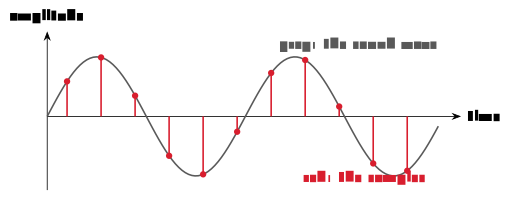
How often is often enough? That question has an exact answer.
Definition 3.3 (Nyquist’s theorem) To digitise a signal faithfully, the sample rate must be at least twice the highest frequency present. Sampling more slowly causes aliasing: The digitised signal reappears as a slower, wrong wave.
The theorem explains the numbers on every spec sheet. Human hearing reaches about 20 kHz, so the Nyquist minimum is 40 kHz - and the CD’s 44.1 kHz is that minimum plus a small engineering margin. Telephone calls sample at 8 kHz (speech survives it), voice recording at 16–22 kHz, DVD audio at 48 kHz, and “hi-res” formats at 96 or 192 kHz. Audio formats then follow the compression split: MP3 (lossy, ~10× smaller, universally compatible), AAC (lossy, better than MP3 at equal bitrate - iTunes, YouTube), FLAC and ALAC (lossless, ~2× - bit-perfect archives).
Video is images plus audio plus timing: Many frames per second with a synchronised sound track. Frame rates to recognise: 24 fps is cinema, 25 fps European TV, 30 fps US TV, 60 fps games and smooth motion, 120+ for slow-motion capture. The sizes are brutal without compression - one hour of uncompressed 1080p at 30 fps is about 670 GB; H.264 brings it to roughly 2 GB and H.265 to about 1 GB - which H.264 achieves, as above, by storing differences between frames.
Two words that everyone confuses deserve a definition each, because they name different things: The codec is the compression method for the audio or video stream (H.264, H.265, AAC, MP3); the container is the file format that packages streams together with timing and metadata (MP4, MKV, WebM). “An MP4 video with H.264 video and AAC audio” now parses: .mp4 is the container, H.264 the video codec, AAC the audio codec. Most online video uses some part of the MPEG-4 family - MP4 as container, H.264 (AVC) as the web-standard codec, H.265 (HEVC) at roughly half the size, AAC for audio - with newer, royalty-free rivals gaining ground: VP9 (YouTube’s default since about 2015), AV1 (backed by Google, Mozilla and Netflix, smaller still), and the WebM container that carries them.
Put the whole chapter together and you get streaming: In 2024 video made up about 82 % of Internet traffic; an hour of HD Netflix moves roughly 3 GB instead of the hundreds of gigabytes it would be raw - compression on the order of 200× - and adaptive bitrate lets playback start in a couple of hundred milliseconds. Encodings, formats and codecs are not trivia; they are the reason the modern web functions at all.
3.8 Assignment 1, and what comes next
Assignment 1 covers Modules 2 and 3, and its deadline approaches - do not leave it for the last weekend. Alongside the number-system tasks of Chapter 2 it may include a UTF-8 byte sequence for a given character: Approach it exactly as in Example 3.1 - identify the byte pattern first, then fill in the data bits - and check yourself with a calculator’s programmer mode. Show your working; partial credit rewards clear reasoning; submit early enough to resubmit if needed.
Before Lecture 4 (The computer). Read the Module 4 chapter in the textbook (Readings.xlsx for the pages). Watch the short CPU-basics video in Canvas (~30 minutes). Try this: Open Task Manager or Activity Monitor and find how many CPU cores your machine has. And think about one question: If a CPU runs three billion instructions per second, what happens inside one instruction?
3.9 Summary
Encoding is a convention, applied four times: ASCII maps 128 English characters to 7-bit numbers; code pages stretched it and collided; Unicode (Definition 3.1) gives every character of every script a code point, and UTF-8 - variable length, ASCII-compatible, the universal default - turns code points into bytes (Example 3.1). Files are all bytes: Text files are the ones read as characters, and magic numbers, not extensions, say what a file really is. Images are pixels (raster) or instructions (vector); screens add RGB light while printers subtract CMYK ink. Compression (Definition 3.2) is lossless - patterns exploited, nothing lost - or lossy - the imperceptible discarded, at ratios that make streaming possible. Sound is samples, governed by Nyquist’s theorem (Definition 3.3); video is frames plus audio plus timing; and a media file is a container carrying streams compressed by codecs. Next week we stop asking how data is represented and open the machine that computes with it.
Interactive checks
A round of quick interactive drills - instant feedback, all in your browser, nothing recorded. Every task has a show-solution button; clicking it straight away is no fun.
Self-check
Exercise 3.1 (ASCII arithmetic) Explain why '5' − '0' = 5 works in ASCII, and what single-bit relationship connects 'a' and 'A'.
Exercise 3.2 (UTF-8 by hand) Encode the Norwegian Ø (code point U+00D8) in UTF-8, showing the byte pattern and the fill-in step.
Exercise 3.3 (Magic numbers versus extensions) A colleague renames report.pdf to holiday.jpg. What will an image viewer’s format detection conclude, and why?
Exercise 3.4 (Choosing image formats) Which format would you choose for (a) a screenshot of a table, (b) a holiday photo, (c) a company logo that must scale from favicon to billboard - and why, in one clause each?
Exercise 3.5 (Nyquist and the CD) Why does a CD sample at 44.1 kHz rather than, say, 25 kHz - and what would go wrong at the lower rate?
- The digit characters occupy consecutive codes starting at 48, so subtracting
'0'yields the digit’s value;'a'='A'+ 32, i.e. upper and lower case differ in exactly one bit. (2) U+00D8 = 1101\,1000_2 needs more than 7 bits \Rightarrow two-byte pattern110xxxxx 10xxxxxx; eleven data bits000 1101 1000fill in as 1100\,0011\;1001\,1000 = \texttt{C3 98}. (3) It reads the first bytes: They say%PDF-, so the file is a PDF regardless of the name - extension is convention, the magic number is reality. (4) (a) PNG - lossless, text stays crisp; (b) JPEG or WebP - lossy is invisible on photos and ten times smaller; (c) SVG - vector scales perfectly at any size. - Hearing extends to about 20 kHz, and Nyquist requires sampling at at least twice the highest frequency; 44.1 kHz clears 2\times20 kHz with a margin, whereas 25 kHz could only capture content up to 12.5 kHz and higher frequencies would alias into audible, wrong ones.
With this chapter, the representation half of the course is complete: Numbers, text and media are all bit patterns under agreed conventions (Chapters 1–3). What we have treated as a black box is the machine that processes them. Chapter 4 opens that box, building upward from the transistor through logic gates to a CPU running the HIDAS cycle - where the binary arithmetic of Chapter 2 returns, this time as hardware.