8 The transport layer
Chapter 7 ended on a deliberate tension: HTTP needs every byte to arrive, in order; a video call does not - a late frame is worthless, a missing one barely noticed. The transport layer resolves the tension by offering two delivery services and letting each application choose: Reliable TCP, and lean, fast UDP. The chapter’s core idea in one line: The transport layer connects processes, not just machines, and lets an app choose reliability or speed. Everything begins with one small idea the network layer lacks - the port.
8.1 Transport basics: Ports and sockets
What does the transport layer add on top of the network below it? The network layer (Chapter 9’s subject) reaches the right machine; transport reaches the right process on it. It runs on the end machines only - not in the routers between them - and it gives an application the illusion of a private, logical channel to a specific process on another host: The app just reads and writes bytes, transport cuts them into segments, addresses them, and hands them to IP. Your laptop runs dozens of network programs at once; transport is what keeps their data from getting mixed up.
That un-mixing has a name pair: Multiplexing gathers data from many processes into one channel on the sender; demultiplexing splits arriving data back to the right process on the receiver. For demultiplexing to work, every segment must name its process - which is exactly what ports are for.
Definition 8.1 (Port, socket) A port is a 16-bit number carried in every segment header (source and destination) that identifies a process on a host; an IP address finds the host, the port finds the program. The pair IP address + port is one endpoint of a conversation and is called a socket, written IP:port. A TCP connection is named by its pair of sockets - the four values source-IP, source-port, destination-IP, destination-port.
Sixteen bits give 65 536 ports, split by convention: 0–1023 are the well-known ports of standard services; 1024–49 151 are registered to applications; 49 152–65 535 are ephemeral - temporary, chosen by clients. The well-known numbers worth memorising, since they recur in every lab and exam: 20/21 FTP, 22 SSH, 25 SMTP, 53 DNS, 67/68 DHCP, 80 HTTP, 110 POP3, 143 IMAP, 443 HTTPS. Loading a page, the server listens on its fixed 443 while your machine picks a random ephemeral port for its own end - so the connection might be 10.0.0.5:51000 ↔︎ 93.1.2.3:443: Two sockets, one conversation.
Before the details, the two protocols side by side. TCP performs a handshake first, guarantees ordered delivery, and pays for it in overhead; UDP has no connection at all, delivers best-effort, and costs almost nothing. TCP suits the web, mail and files; UDP suits media, DNS and games. Neither is “better”: The application picks the trade-off that fits its needs from Chapter 7’s table - and both ride on IP underneath.
Pick the transport protocol for each application, with a one-clause reason: (a) downloading a software update; (b) the voice channel of an online game; (c) a DNS lookup; (d) submitting your arbeidskrav through Canvas.
Solution. (a) TCP - one flipped byte corrupts the whole installer, so loss is unacceptable. (b) UDP - a glitch beats a stall; late audio is worthless. (c) UDP - one small question, one small answer; a lost query is simply re-asked. (d) TCP - it rides on HTTPS, and your submission must arrive complete and in order.
8.2 UDP: The minimal option
Definition 8.2 (UDP) The User Datagram Protocol is the bare minimum on top of the network layer: No handshake - just send the datagram (“fire and forget”); segments may be lost or arrive out of order, and UDP does not fix it. In exchange: A tiny header, no setup delay, and speed.
How tiny? The UDP header is exactly four small fields - source port, destination port, length, checksum - eight bytes in all, against TCP’s twenty-plus. That is the whole point. Where does the speed-over-safety trade pay off? Live multimedia, where a lost video frame is better than a stalled stream; DNS, where one small question deserves one small answer with no ceremony (notice how Chapter 7’s lookups fit connectionless UDP perfectly); management protocols like SNMP - and, as the chapter’s end reveals, UDP is also the base that QUIC and HTTP/3 build on.
One safety check even UDP keeps: The checksum. The sender treats the segment as a list of 16-bit words, adds them all, and stores the one’s-complement result; the receiver re-adds and compares, and a mismatch means the data was damaged in transit. Note the limits precisely: The checksum can detect an error, not repair it - UDP simply drops a bad segment, and whether anyone cares is the application’s business.
8.3 TCP: Connections
When dropping data is not acceptable, we need the Transmission Control Protocol, and its promise-list is worth reading slowly, because each item costs machinery that the rest of the chapter explains. TCP is reliable - every byte arrives; lost segments are detected by acknowledgements and resent. It is in order - each byte is numbered, so the receiver reassembles the stream exactly as sent. It is connection-oriented - set up before any data flows. It applies flow and congestion control - the sender is paced so that it floods neither the receiver’s buffer nor the network itself. And it is full duplex, point-to-point - one sender, one receiver, both directions carrying data at once. This is what the web, e-mail and file transfer sit on; they cannot tolerate missing or scrambled bytes.
Definition 8.3 (The three-way handshake) Before any data, both sides agree to talk and exchange starting numbers: The client sends SYN (with its initial sequence number x); the server answers SYN+ACK (its own sequence number y, acknowledging x+1); the client answers ACK (y+1). The two sides have now exchanged sequence numbers and agreed parameters such as the maximum segment size (MSS); data can flow both ways.
Example 8.1 (The handshake in Wireshark) The ceremony is three real packets, and a capture shows them exactly as the diagram promises: Packet 1, 10.0.0.5 → 93.184.6.20, 49152 → 443 [SYN] Seq=0; packet 2, the reverse direction, [SYN, ACK] Seq=0 Ack=1; packet 3, [ACK] Seq=1 Ack=1 - fourteen milliseconds after the first, and the connection is open. Notice the ports doing Definition 8.1’s work: 443 names the HTTPS server process, 49152 the ephemeral client end. In the Practice you capture this yourself.
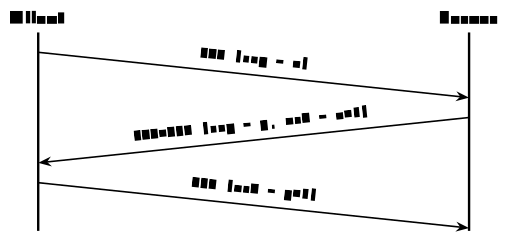
The sequence numbers of the handshake are the heart of everything that follows: Every byte of the stream has one, and the receiver replies with an acknowledgement naming the next byte it expects - so an ACK of 93 means “I have everything up to 92; send 93 next.” These numbers are the bookkeeping behind reliability, and they live - with the ports, the flags that run the handshake, the window of Section 8.4, and a checksum - in the TCP header, which is larger than UDP’s precisely because it carries everything reliability needs. Opening politely also means closing politely: Each side finishes independently by sending a FIN (“I am done sending”), acknowledged by the other - four packets in all, because TCP is full-duplex and each direction closes separately.
Between the handshake and the final FIN, every TCP endpoint moves through a small set of named states, and you can watch them: Run netstat and the state column shows exactly these names. A server socket waiting for clients is LISTEN; a connection in normal use is ESTABLISHED; the FIN exchange walks each side through closing states. The curious one is TIME_WAIT: The side that closes last keeps the dead connection’s socket pair reserved for a couple of minutes before releasing it. Why linger? Because the network may still deliver stragglers - old, slow packets from the closed connection - and if the same socket pair were reused immediately, a delayed segment from the old conversation could be mistaken for data in the new one. The wait lets the network drain. This is why a restarted server sometimes complains that its address is “already in use”: Not a bug, but TCP being careful.
(Dostálek & Kabelová, 2006, ch. 9)
8.4 TCP: Reliability and flow
The network below may lose, reorder or corrupt any segment - Chapter 9 shows routers doing exactly that when queues overflow - yet TCP delivers a perfect, ordered byte stream on top of it. The toolkit has four parts: Checksums detect, ACKs confirm, sequence numbers order, retransmission recovers. The general recipe - acknowledge what arrived, resend what did not - underlies reliable transfer everywhere, and TCP implements it with a few refinements worth knowing individually.
Retransmission and the timer. The sender starts a timer for each segment; if no acknowledgement arrives before it expires, it assumes loss and resends. How long should the timer be? Too short and you resend needlessly; too long and recovery crawls. TCP measures the round-trip time (RTT) of recent segments, keeps a smoothed average plus a margin for how much the RTT varies, and sets the timeout a little above that - adapting continuously, so a connection across the world gets a patient timer and one to the next room a snappy one.
Fast retransmit. Sometimes the ACKs reveal a loss sooner than any timer. If a segment goes missing, the receiver keeps acknowledging the last in-order byte it has - so the sender sees duplicate ACKs. Three identical ACKs are taken as a signal that a segment is missing, and the sender resends it immediately, without waiting for the (deliberately cautious) timeout.
Pipelining. Sending one segment, waiting, then sending the next would waste the link, so TCP keeps a whole window of unacknowledged segments in flight at once. Two textbook schemes frame the design space: Go-Back-N resends, on a loss, that segment and everything after it - simple, but it may resend data that already arrived; Selective Repeat resends only what was actually lost - thriftier, at the price of more bookkeeping. Real TCP blends both ideas.
Flow control. Finally, the receiver must not be buried: It advertises a window - how much free buffer it currently has - and the sender may have at most that much unacknowledged data in flight. A slow receiver shrinks the window; a fast one grows it. Flow control protects the receiver. There is, however, a second thing to protect: The network in between.
8.5 Congestion, fairness, and QUIC
Keep the two controls apart, because the exam likes the distinction and so does clear thinking: Flow control protects the receiver from being sent too much, too fast; congestion control protects the network when too many senders flood the shared links at once. When links overload, router queues grow and packets are dropped - so TCP senders treat loss as the signal to slow down.
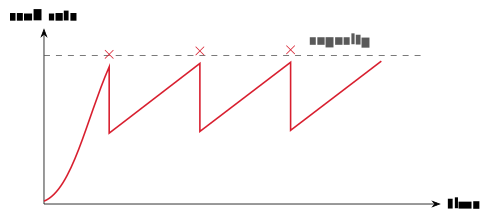
TCP’s reaction has a characteristic shape. In slow start it ramps up quickly, probing for capacity; on a loss it halves its rate, then climbs again gently; and the cycle repeats - a sawtooth of send rate over time, forever probing for the most the network will bear. Who decides the cut-backs? In the classic, end-to-end design the network gives no feedback at all: Endpoints infer congestion from lost packets and growing delay, and back off - this is standard TCP. In network-assisted designs, routers signal congestion explicitly - for instance by setting a flag bit - so senders slow down sooner. Either way, when several connections share a bottleneck the goal is fairness: If K TCP connections share a link of rate R, each should get about R/K - and TCP’s “slow down on loss, speed up otherwise” behaviour tends towards exactly that balance, which is why one download does not (usually) starve all your other connections.
One modern protocol rethinks the whole package: QUIC, the carrier of HTTP/3 from Chapter 7. It is built on UDP but adds TCP-style reliability and congestion control itself; it combines the connection and encryption setup into fewer round-trips; and it avoids one slow stream blocking the others (“head-of-line blocking”). The lesson QUIC teaches is bigger than QUIC: The layers are not frozen - when TCP’s habits got in the way, the web rebuilt reliability over the leaner UDP.
Tools close the chapter, as usual. netstat shows open and connected ports (-a includes UDP, -s statistics, -r routes); TCPView is a Windows GUI showing live connections; nmap scans a host for open ports - useful when tuning a firewall; and Wireshark, from Chapter 6, shows handshake, data and teardown as an actual flow graph.
Before Lecture 9 (The network layer). Read the Module 9 chapter in the textbook (Readings.xlsx for the pages). Try this: Run netstat and identify a few of your machine’s open connections - which sockets, which states? And think about the assumption this whole chapter quietly made: A packet may cross a dozen networks to reach a server. How does each router know where to send it next?
8.6 Summary
Transport connects processes, via ports: Multiplexing in, demultiplexing out, with IP + port forming a socket and a socket pair naming a connection (Definition 8.1). UDP (Definition 8.2) is fast and connectionless - an 8-byte header, possible loss and reordering, a checksum that detects but never repairs - and is exactly right for media, DNS and the foundations of QUIC. TCP is reliable and connection-oriented: A three-way handshake (Definition 8.3, Example 8.1) opens an ordered, full-duplex byte stream that a FIN exchange closes; reliability is ACKs plus adaptive retransmission, sharpened by fast retransmit on three duplicate ACKs and made efficient by a pipeline window; flow control paces the sender to the receiver’s buffer. Congestion control - a different job - paces everyone to the network: Slow start, back-off on loss, and a sawtooth that shares a bottleneck at roughly R/K per flow. Next week we drop beneath the assumption TCP rested on: How a packet actually crosses the internet at all.
Interactive checks
A round of quick interactive drills - instant feedback, all in your browser, nothing recorded. Every task has a show-solution button; clicking it straight away is no fun.
Self-check
Exercise 8.1 (Sockets and port choice) Your browser opens https://example.org. Give a plausible socket pair for the connection and say which side chose each port, and how.
Exercise 8.2 (TCP or UDP, by application) Why does DNS use UDP while file transfer uses TCP? Argue from the needs table of Chapter 7 and from Definition 8.2.
Exercise 8.3 (Duplicate ACKs) A TCP receiver sends ACK 501, then ACK 501, then ACK 501 again. What has happened, and what will the sender do - and when?
Exercise 8.4 (Flow versus congestion control) Distinguish flow control from congestion control in one sentence each, naming what each protects and what signal each reacts to.
Exercise 8.5 (Sharing a bottleneck fairly) Four TCP downloads share a 100 Mbit/s bottleneck. Roughly what rate does each get, and which TCP behaviour pushes them towards that split?
- For example
10.0.0.5:51447↔︎93.184.216.34:443: The server’s 443 is the well-known HTTPS port; the client’s 51447 is an ephemeral port its OS picked from 49152–65535. (2) A DNS lookup is one small request and one small answer - connection setup would cost more than the exchange itself, and a lost query is simply re-asked; file transfer tolerates delay but no loss, so it needs TCP’s ordered, guaranteed delivery. (3) A segment was lost; the receiver keeps acknowledging the last in-order byte. On the third duplicate ACK the sender fast-retransmits the missing segment immediately, without waiting for the retransmission timer. (4) Flow control protects the receiver, reacting to the advertised window; congestion control protects the network, reacting to loss (and growing delay). (5) About 25 Mbit/s each (R/K); each flow’s “slow down on loss, speed up otherwise” probing makes the shares converge towards equality.
Transport delivers reliably (TCP) or leanly (UDP) between processes - resting, in turn, on an assumption of its own: That a packet can cross a dozen networks and arrive at the right machine at all. Chapter 9 makes that assumption true: IP addresses, routing hop by hop, and subnet arithmetic in which the AND masking of Chapter 2 does real work.