7 The application layer
Chapter 6 mapped the five layers; from now on we descend through them, one per chapter, and we begin at the top - where your programs actually talk to each other. Everything below the application layer exists to carry these conversations. The plan mirrors a real page load: First how communicating programs are arranged at all, then how a name becomes an address (DNS), then the conversation itself (HTTP), and finally the two other classics - e-mail and file transfer - with the security lesson that all of them teach: Encrypt by default.
7.1 Application architectures
The application layer is where your software lives - browsers, mail clients, games, apps. Each application defines a protocol (Definition 6.2): An agreed conversation between its parts. It does not move bytes itself; it hands them to the transport layer below. The examples of this chapter - HTTP, DNS, SMTP, FTP - are each a different conversation for a different job, but almost all of them follow one of two shapes.
Definition 7.1 (Client/server and peer-to-peer) In a client/server architecture, one side - the client - takes the initiative and requests a service; the other - the server - is always on, has a fixed address, and delivers it. In a peer-to-peer (P2P) architecture, every machine is both client and server at once.
Most of the web is client/server: Your browser is a client; the website runs on servers. P2P has real advantages - no always-on central servers needed, and it self-scales, since more users bring more capacity - and real drawbacks: Security and reliability are hard in distributed systems, peers come and go unpredictably, and the model’s history is entangled with unmanaged file sharing. Classic P2P: File-sharing networks, and parts of blockchains today. Many real systems mix the two shapes into hybrids: Skype, Teams and their kin use a central server to solve the hard “where are you?” problem - looking up the other party’s address - and then run the actual call peer-to-peer, directly between the two machines, saving the server’s bandwidth.
One more idea prepares next week. Different applications make very different demands on the network below: Audio and video tolerate data loss (a glitch is fine) but demand timing; file transfer and banking tolerate delay but allow no loss at all; streaming needs a minimum bandwidth where e-mail works at any speed. These needs shape which transport protocol an application chooses in Chapter 8 - reliable TCP, or fast-and-lean UDP.
7.2 DNS: Names to addresses
Before any program connects, a name must become an address: You type www.kristiania.no; the network needs an IP address. People remember names; machines route by numbers.
Definition 7.2 (DNS) The Domain Name System translates domain names into IP addresses - the internet’s phone book, and the first step of almost every connection. It is deliberately distributed: No single server holds every name; the data is spread worldwide across a hierarchy, so there is no single point of failure and no machine drowning in the world’s lookups.
The hierarchy is a tree. At the top, the root (thirteen root server identities worldwide) points to the top-level domain (TLD) servers - .com, .no, .org - which point in turn to each organisation’s own authoritative server.
Example 7.1 (Resolving a name, step by step) Your machine does not walk the tree itself; it asks its local resolver, which does. (1) Your PC asks the resolver for www.kristiania.no. (2) The resolver asks the root - answer: “ask .no”; asks the .no TLD server - “ask Kristiania’s server”; asks Kristiania’s authoritative server - which returns the IP. (3) The resolver hands the address back, and your browser can connect. Doing this walk for every single lookup would be slow, so answers are remembered: Resolvers cache what they have looked up, and every record carries a TTL (time-to-live) saying how long it may be cached. That is why a changed DNS record takes a while to “spread”: Old answers live on in caches until their TTL runs out.
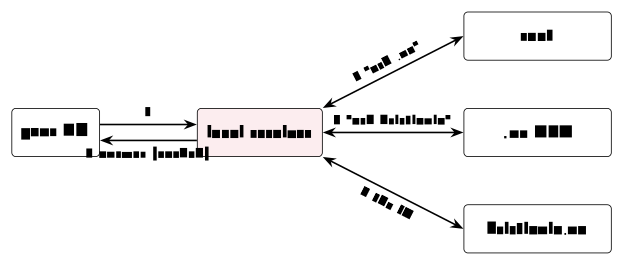
www.kristiania.no: Your PC asks the local resolver (1); the resolver walks root, TLD and authoritative server (2–4) and returns - and caches - the answer (5).
What exactly is stored? DNS is a distributed database of small typed resource records, each with four fields - name, value, type, TTL. The types to know: A maps a name to an IPv4 address; AAAA to an IPv6 address; CNAME declares an alias for another name; MX names the mail server for a domain; NS names the authoritative name server. So DNS does more than addresses - an MX record is how e-mail finds the right server, as Section 7.4 uses. And all of it is queryable by hand, which is the best way to make the theory concrete: nslookup www.kristiania.no for the address behind a name; dig kristiania.no MX for a domain’s mail servers; and dig +trace to watch the resolver’s walk - root, TLD, authoritative - appear answer by answer.
Two details from the standard reference sharpen the resolution story. First, the two roles in Example 7.1 have proper names: Your PC sends a recursive query - “get me the final answer, do the work yourself” - and the resolver, in turn, asks the root, TLD and authoritative servers iterative queries, each answered only with a referral to the next server. A flag bit in every DNS message (recursion desired) requests the first behaviour, and the busy root and TLD servers simply refuse it - they refer, and never chase answers for anyone. Second, DNS can also run backwards: To turn an IP address into a name, a special domain in-addr.arpa holds the address bytes in reverse order - the name behind 158.36.10.4 is looked up as 4.10.36.158.in-addr.arpa - so that the address’s network part, like any domain, sits at the right-hand, delegatable end. This reverse DNS is what traceroute uses to print router names instead of bare addresses.
(Dostálek & Kabelová, 2006, ch. 11)
7.3 The web and HTTP
With the address in hand, the browser can finally talk to the server. The browser is the client half of a web application: It understands HTML (structure), CSS (style) and JavaScript (behaviour), and one “page” usually means many requests - text, images, scripts, fonts. Open the developer tools (Ctrl-Shift-I in Chrome), reload any page, and watch the requests fly; each one is a single HTTP exchange.
Definition 7.3 (HTTP) The Hypertext Transfer Protocol is a client/server conversation over TCP: The browser opens a TCP connection (a socket) to the server’s port - 80 for HTTP, 443 for HTTPS - sends a request, and reads the response. Both are plain text: A first line, some headers, then a body.
Example 7.2 (One exchange, for real) The request:
GET /index.html HTTP/1.1
Host: www.kristiania.no
User-Agent: Firefox
Accept: text/html
The response:
HTTP/1.1 200 OK
Content-Type: text/html
Content-Length: 1024

<html>...</html>
Method and path drive the request; the status line opens the response; headers describe each side’s payload. Nothing here is binary mystery - it is text you could type.
The path and host in that request came from a URL, which packs several pieces into one string. In https://www.example.org:443/a/b/c.txt?t=win&s=chess#p5: The scheme (https) names the protocol; the authority (www.example.org) is the host, resolved by DNS; the port (:443) is often implied by the scheme; then the path to the resource, the query parameters after the ?, and the fragment after the # - a spot within the page.
Decompose the URL
https://api.example.com/v2/users?id=7&lang=no#profileinto its components - and say which component DNS resolves, and which component the request line of Example 7.2 carries.
Solution. Scheme https (so port 443 implied); host api.example.com; path /v2/users; query id=7&lang=no; fragment profile. DNS resolves the host; the request line carries the path (plus query) -
GET /v2/users?id=7&lang=no HTTP/1.1- while the host travels in the
Host:header.
The first word of the request is the method, the verb saying what you want done with the resource: GET fetches, POST sends data to the server, HEAD asks only for the headers, PUT uploads to the given URL, DELETE removes it - with GET and POST covering almost all everyday browsing. The response’s first line carries a three-digit status code whose first digit gives the category: 1xx informational; 2xx success (200 OK); 3xx redirection (301 Moved); 4xx client error - including the famous 404 Not Found, which simply means the client asked for something the server does not have; 5xx server error (500 Internal Error).
One design decision of HTTP has consequences you meet daily: HTTP itself is stateless - by default, each request is independent and the server forgets you afterwards. So how do logins and shopping carts survive between requests? Through cookies: The server sends a Set-Cookie header; the browser stores the value and returns it in a Cookie header on later requests, letting the site recognise you. Cookies can be persistent (stored until an expiry date) or last only for the current session.
Everything so far crosses the wire as readable text - and Chapter 6’s Wireshark showed what that means on a shared network: Anyone on the path could read it. HTTPS closes the hole: It is ordinary HTTP carried over a TLS-encrypted transport connection, protecting the content and confirming you are talking to the real server - default port 443, the padlock in the address bar, and the web’s default today. Finally, HTTP itself has evolved, each version removing a bottleneck of the one before: HTTP/0.9 (1991) knew only one-line GET; HTTP/1.0 (1996) added headers, status codes, POST and HEAD; HTTP/1.1 (1997) added persistent connections that reuse the TCP link; HTTP/2 (2015) multiplexes many requests on one connection; HTTP/3 (2022) runs over QUIC, on UDP, for faster setup. The trend in one line: Fewer round-trips, more parallelism - the same conversation, delivered quicker.
7.4 E-mail
E-mail is older than the web and still everywhere, and it separates cleanly into three parts: A user agent to read and write mail (Outlook, Apple Mail, …), a mail server that holds your inbox and a queue of outgoing mail, and the protocols that move messages between them. The division of labour is the thing to learn: SMTP carries mail towards the recipient - user agent to server, and server to server - while IMAP or POP3 fetch it back from the server to your devices.
SMTP, the Simple Mail Transfer Protocol, uses TCP (default ports 587 for submission by clients and 25 between servers) and runs a short scripted conversation - HELO, MAIL FROM:, RCPT TO:, DATA - after which the message body follows, ending with a single “.” on a line of its own. The word that captures SMTP’s character: It pushes - the sender drives the data towards the recipient’s server. Collection is the second protocol’s job, and the two options split by lifestyle: POP3 is simple - authorise, download to the client, often removing mail from the server afterwards - and fits a single machine; IMAP keeps mail on the server, organised in folders, so the same mailbox stays in sync across devices - the natural fit for today’s phone-plus-laptop world.

Set SMTP beside HTTP and the contrast teaches both: SMTP pushes data to the receiver, HTTP pulls it on request; SMTP holds one persistent connection and packs many objects into one message, classic HTTP opened a connection per request and carried one resource each; SMTP’s message format is 7-bit ASCII - binary attachments travel base64-encoded via MIME - while HTTP bodies carry any bytes. Same layer, same TCP underneath, but each shaped by what it was designed to do.
7.5 File transfer, and the security lesson
The last classic job is moving whole files, and its traditional protocol has an unusual shape worth knowing.
Definition 7.4 (FTP) The File Transfer Protocol separates commands from data: A control connection on TCP port 21 carries the commands, while a separate data connection carries the files themselves. FTP is stateful: The server remembers the session - your login, your current folder - between commands.
The command set over the control channel is small: user and pass to log in, dir/ls to list files, get to download, put to upload. A graphical client like FileZilla wraps these in drag-and-drop - but the same commands run underneath, and in the Practice you will speak them yourself against a real FTP server and watch the two connections appear.
Now the lesson the whole chapter has been building towards. Plain FTP sends everything - including your password - in the clear; plain HTTP sends your pages likewise. Their secure successors differ in mechanism but agree in spirit: SFTP is a different protocol (not “FTP with an S”) that runs file transfer over SSH, encrypted end to end; HTTPS is HTTP over TLS, as above. The general rule deserves italics: Any plaintext protocol can be read by someone on the path; modern practice is to encrypt by default. When Wireshark shows you a plaintext FTP login in the lab, the rule will stop being abstract.
Before Lecture 8 (The transport layer). Read the Module 8 chapter in the textbook (Readings.xlsx for the pages). Try this: In your browser’s developer tools, open the Network tab and reload a page - count the requests behind one “page”. And think about the question that opens next week: HTTP needs every byte to arrive in order; a video call does not. Should they really use the same delivery service underneath?
7.6 Summary
Applications are arranged client/server or peer-to-peer (Definition 7.1), with hybrids using a server to find each other and direct connections for the heavy data. Before anything connects, DNS (Definition 7.2) turns names into addresses through a distributed hierarchy - root, TLD, authoritative - softened by caching and TTLs, and carrying typed records (A, AAAA, CNAME, MX, NS) that do more than addressing. HTTP (Definition 7.3, Example 7.2) fetches the web in plain-text request/response pairs - methods, status codes, URLs - with cookies supplying the state that the protocol itself deliberately lacks, and versions 1.1, 2 and 3 trimming round-trips. E-mail splits into user agent, server and two protocol roles: SMTP pushes mail towards the recipient, POP3 or IMAP pulls it back. FTP (Definition 7.4) moves files over separate control and data connections - and, like plain HTTP, in the clear, which is why SFTP (over SSH) and HTTPS (over TLS) exist and why the chapter’s closing rule is encrypt by default. Next week we drop one layer: How all these conversations are actually delivered.
Interactive checks
A round of quick interactive drills - instant feedback, all in your browser, nothing recorded. Every task has a show-solution button; clicking it straight away is no fun.
Self-check
Exercise 7.1 (Hybrid architectures) Skype-like systems are called hybrid architectures. What exactly does the central server do, what runs peer-to-peer, and why is that split efficient?
Exercise 7.2 (Resolving a name) Walk through the resolution of a name your resolver has never seen: Which three servers answer, in which order, and what does each answer say? Then explain why the second lookup of the same name is faster.
Exercise 7.3 (URL components) Decompose https://shop.example.no:443/varer/sko.html?size=42#top into its six URL components.
Exercise 7.4 (Status codes and statelessness) Your browser shows a 404 on one page and a 500 on another. Whose fault is each, by category - and what does statelessness mean for the request you send right after?
Exercise 7.5 (The mail protocols) In one sentence each: What does SMTP do, what do POP3/IMAP do, and which of the two collection protocols suits someone reading mail on a phone and a laptop?
- The server only answers “where is the other party?” - the lookup; the call’s audio and video then flow directly between the peers, so the heavy bandwidth never touches the server. (2) Root (“ask the TLD”), then the TLD server (“ask the organisation’s authoritative server”), then the authoritative server (the IP itself); the resolver caches the answer, so the second lookup is served locally until the record’s TTL expires.
- Scheme
https; hostshop.example.no; port443; path/varer/sko.html; querysize=42; fragmenttop. (4) 404 is a 4xx - client error: The thing asked for does not exist there; 500 is a 5xx - server error: The server failed while handling a valid request. Statelessness means the next request is independent - the server has forgotten the exchange, unless a cookie carries the state back. (5) SMTP pushes mail towards the recipient’s server; POP3/IMAP fetch it from that server to your devices; IMAP - it keeps the mailbox on the server and in sync across devices.
Applications now talk: Names resolve, pages load, mail moves - but every protocol of this chapter quietly assumed that its bytes would arrive, and arrive in order. Chapter 8 examines the layer that makes that promise - or deliberately declines to: Transport, with ports to find the right process and the TCP-versus-UDP choice that this chapter’s applications demanded.